

For enterprise websites operating hundreds of thousands or millions of URLs, search visibility is not limited by keyword research or content volume; it is fundamentally bottlenecked by crawl efficiency. Search engine crawlers operate under finite computational constraints, allocating a designated budget of HTTP fetch requests to each domain based on infrastructure responsiveness, algorithmic demand, and historical content quality. When an enterprise platform allows low-value faceted filter parameters, uncached endpoints, redirect chains, or soft 404 loops to consume this quota, high-converting commercial pages and newly launched editorial assets remain unindexed for weeks or months. Mastering enterprise crawl budget architecture is the engineering discipline of ensuring every single Googlebot request translates directly into indexation velocity and organic revenue. This comprehensive guide details the exact protocols, header configurations, log analysis techniques, and edge routing architectures required to eliminate crawl waste across massive web ecosystems.
The Enterprise Threshold for Crawl Budget Management:
While small and mid-market websites under 10,000 URLs rarely encounter crawl budget constraints, enterprise architectures exceeding 500,000 URLs, e-commerce storefronts with complex faceted taxonomies, and high-frequency publishing networks must actively optimize crawler resource allocation. Without deliberate crawl path governance, Googlebot spends over 60% of its request volume on duplicate, stale, or non-canonical URL variants.
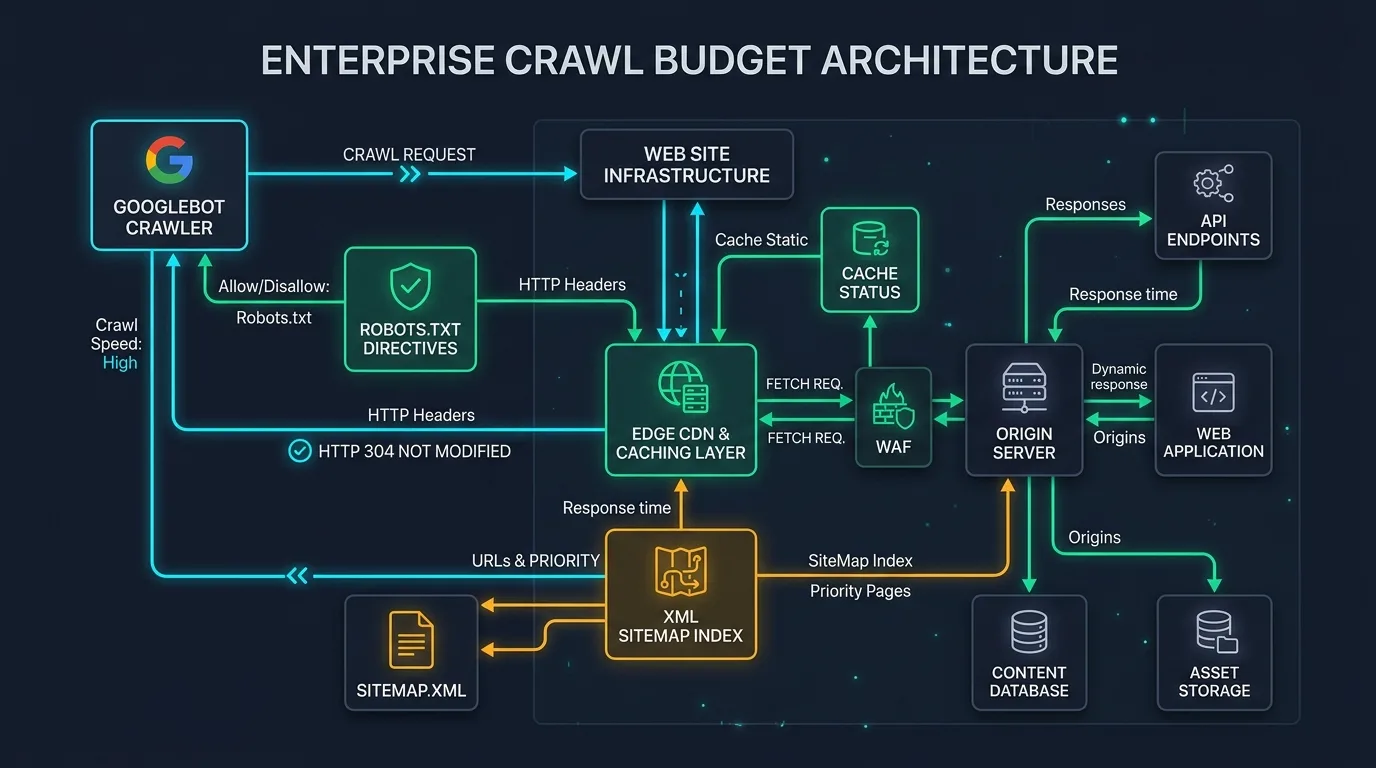
Figure 1: Enterprise Crawl Budget Architecture — Governing Googlebot Fetch Cycles Across Edge CDNs, Robots.txt Rules, HTTP 304 Cache Headers, and XML Sitemap Indices.
Chapter 1: The Core Mechanics of Crawl Budget: Crawl Rate Limit vs. Crawl Demand
In Google's official search documentation and algorithmic infrastructure, "crawl budget" is not an arbitrary singular metric. Rather, it represents the real-time intersection of two independent engineering components: Crawl Rate Limit and Crawl Demand. Understanding how these forces interact is essential for diagnosing why critical sections of your site experience crawl starvation while peripheral pages are crawled continuously.
The Crawl Rate Limit (also termed crawl capacity) is designed to protect your web host infrastructure. Googlebot is programmed to avoid overwhelming origin servers with excessive concurrency that degrades user experience or causes server outages. When Googlebot senses slow server response times (elevated Time to First Byte) or detects HTTP 5xx server errors, it immediately throttles request frequency. Conversely, when your server consistently responds in sub-150ms ranges via edge CDNs with zero error spikes, Googlebot dynamically raises the crawl rate limit, allowing thousands of simultaneous requests per minute without resistance. This directly connects crawl capacity to foundational Core Web Vitals and server response times.
The Crawl Demand (also termed crawl need) represents how much Google actually desires to crawl your URLs. Demand is governed by two primary drivers: URL popularity and freshness. URLs that possess significant PageRank equity, active backlink velocity, and strong user click-through engagement generate perpetual crawl demand. Furthermore, URLs frequently refreshed with genuine topical authority signals demand frequent re-indexing cycles to capture updated content states. If your pages exhibit low commercial value or mirror duplicate text found elsewhere on the web, Google's algorithms purposefully throttle demand, regardless of how fast your servers respond.

Chapter 2: Identifying and Diagnosing Crawl Waste and Index Bloat
Before implementing technical interventions, enterprise teams must conduct rigorous forensic diagnostics to quantify where crawler resources are leaking. Crawl waste occurs whenever a bot fetches a URL that provides no organic ranking utility or commercial indexation value.
The Primary Culprits of Enterprise Crawl Waste
- Uncontrolled Faceted Navigation Parameters: Multidimensional e-commerce filters generate endless combinations of URLs that mirror identical or nearly identical product listings.
- Internal Redirect Chains and Loops: Internal links pointing to outdated HTTP endpoints that hop through 2 or 3 intermediate 301 redirects before reaching the destination, burning crawl quota on intermediate hops.
- Soft 404 Errors and Empty Search Queries: Internal search result pages, zero-inventory category endpoints, and expired event listings returning HTTP 200 OK headers instead of strict 404 or 410 status codes.
- Duplicate Session IDs and Tracking Parameters: Internal tracking parameters (such as UTMs, affiliate tags, or user session tokens) appended to internal links, forcing search engines to crawl separate duplicate URLs for every session.
- Uncached Infinite Scroll and Pagination Endpoints: Poorly architected dynamic feeds that generate endless deep pagination links without crawl termination boundaries.
| Crawl Waste Category | Diagnostic Method | Impact on Crawl Budget | Remediation Architecture |
|---|---|---|---|
| Parameter Traps | Server Log Analysis & Screaming Frog Regex Crawl | Consumes 40%–70% of daily Googlebot hits on duplicate content | Robots.txt wildcards & AJAX client-side facet state management |
| Redirect Chains | Database link audits & Crawl log status filters | Multiplies crawler request overhead per discoverable link by 2x–4x | Direct database update of internal link targets to canonical endpoints |
| Soft 404 Endpoints | Google Search Console Indexing Report & Custom HTTP tests | Causes Googlebot to repeatedly re-verify empty, non-ranking pages | Strict HTTP 404/410 headers or automated 301 consolidation to parent hub |
| Stale Sitemap Bloat | XML Sitemap vs. Log Cross-Referencing | Bots waste bandwidth polling non-updated legacy URLs | Dynamic sitemap partitioning by update frequency with exact lastmod tags |
To eliminate these vulnerabilities systematically, engineering teams must deploy automated technical SEO audit protocols that continuously monitor crawler behavior before index bloat suppresses commercial rankings.
Chapter 3: Advanced Robots.txt Directives, Wildcards, and Crawl Path Isolation
The robots.txt file is your origin server's primary firewall against crawler waste. While meta tags such as noindex require Googlebot to execute a complete HTTP fetch and parse HTML content before understanding the directive, a Disallow rule in robots.txt halts the crawl request before a single byte of page content is downloaded, preserving precious crawl capacity.
Enterprise platforms must utilize sophisticated wildcard patterns to isolate and disallow non-commercial URL spaces while ensuring critical resources remain accessible for rendering.
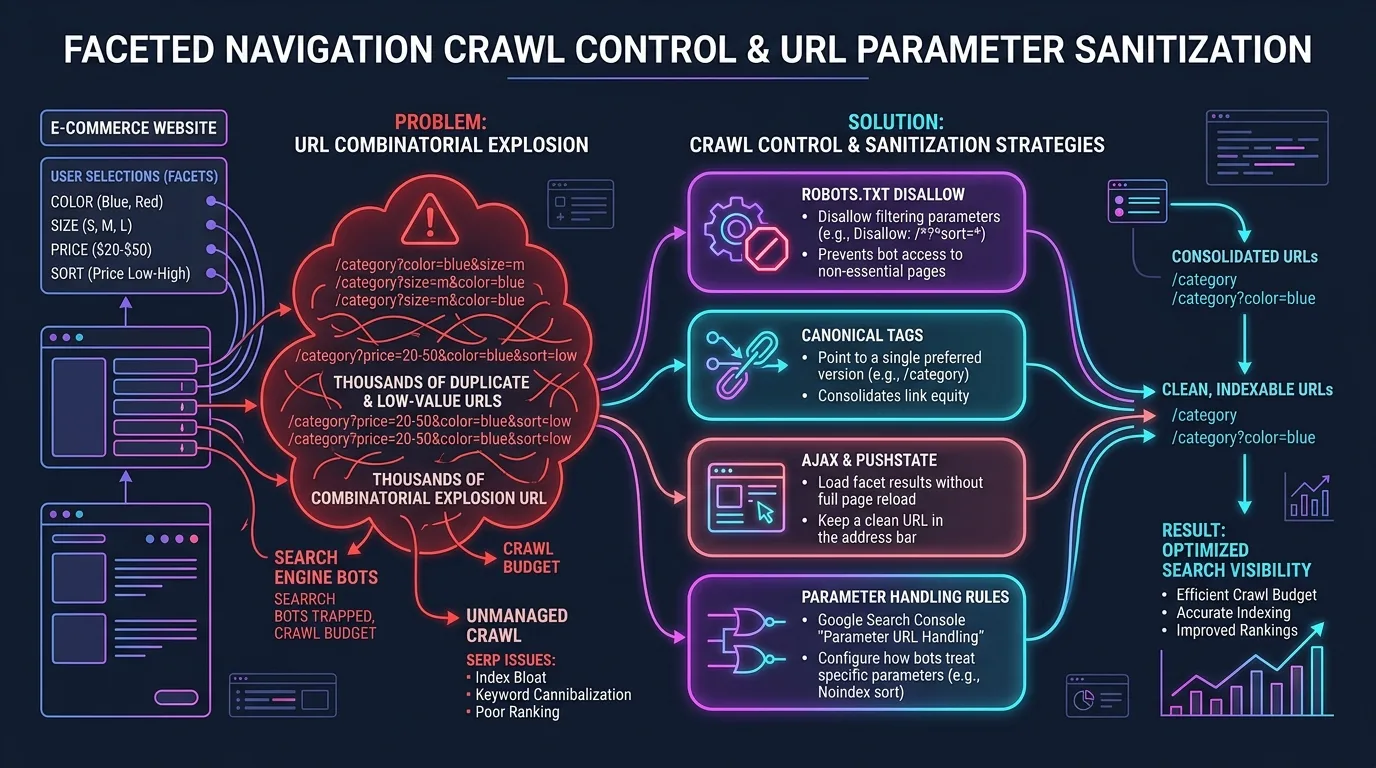
Figure 2: Faceted Navigation Crawl Control — Eliminating URL Combinatorial Explosion via Robots.txt Disallow Rules, Canonical Consolidation, and AJAX Client-Side Filtering.
Production Enterprise Robots.txt Ruleset
Below is a production-grade robots.txt configuration designed for massive platforms handling complex parameter filtering and dynamic routing:
# Enterprise Robots.txt Optimization Pattern
User-agent: Googlebot
User-agent: Googlebot-Image
User-agent: Bingbot

# Allow core assets for modern DOM rendering
Allow: /static/
Allow: /assets/
Allow: /_next/static/
Allow: /*.js$
Allow: /*.css$

# Disallow internal search results and infinite filter parameters
Disallow: /search
Disallow: /search?*
Disallow: /*?*sort=*
Disallow: /*?*price=*
Disallow: /*?*view=*
Disallow: /*?*ref=*
Disallow: /*?*sessionid=*

# Block duplicate pagination loops beyond indexable range
Disallow: /*?*page=1$
Disallow: /*?*p=1$

# Restrict checkout, account, and internal operational endpoints
Disallow: /checkout/
Disallow: /account/
Disallow: /cart/
Disallow: /api/internal/

# Scaled XML Sitemap Index Declarations
Sitemap: https://example.com/sitemaps/sitemap-index.xml
Crucial Warning on Robots.txt vs. Noindex Directives:
Never apply a robots.txt Disallow rule to a URL that currently has a noindex meta tag if your objective is de-indexation. If Googlebot is blocked from fetching the URL by robots.txt, it can never read the noindex tag. The URL will remain in Google's index as an orphaned entry showing only the raw URL and title without a snippet description. Always let Googlebot crawl noindexed pages first, verify index removal in Search Console, and only then apply robots.txt disallow rules.

Chapter 4: Faceted Navigation Architecture: Taming Combinatorial Parameter Explosions
Faceted navigation is essential for e-commerce user experience, enabling shoppers to filter thousands of catalog items by size, color, brand, material, price range, and customer review ratings. However, from a search architecture perspective, faceted navigation is an existential threat to crawl health. When multiple filter facets can be combined in any order, a single category with 50 products can generate over 100,000 unique URLs, creating massive technical SEO crawl errors.
The 4-Pillar Architectural Solution for Facets
- Determine Indexable Facet Value Combinations: Identify high-search-volume filter combinations (e.g., "Men's Running Shoes - Nike - Size 10") and assign them clean, standardized rewrite URLs (e.g.,
/shoes/mens/running/nike/) rather than messy query strings. These curated combinations should be linked via regular anchor tags and submitted in XML sitemaps. - Canonicalize Non-Indexable Multi-Facet Query Strings: For multi-facet parameter combinations that lack unique search demand (e.g., filtering by price sorting + delivery time), set strict
rel="canonical"links pointing back to the clean primary category or single-attribute URL. - AJAX / Fetch API State Management Without URL Mutation: Modern frontend applications built on React or Next.js should handle secondary facet selections (such as sorting or secondary color swatches) using client-side state updates and the
History.pushState()API without generating crawlable anchor tags that Googlebot follows. - Robots.txt Parameter Disallow for Deep Combinations: Block deep combination parameters at the crawl level, preventing search bots from entering combinatorial traps entirely.
When engineering these systems for dynamic web applications, ensure that modern JavaScript SEO and rendering hydration techniques are implemented so that search engine bots do not trigger expensive rendering pipelines for discarded parameter variations.
Chapter 5: Scaled XML Sitemap Index Architecture for 1,000,000+ URL Domains
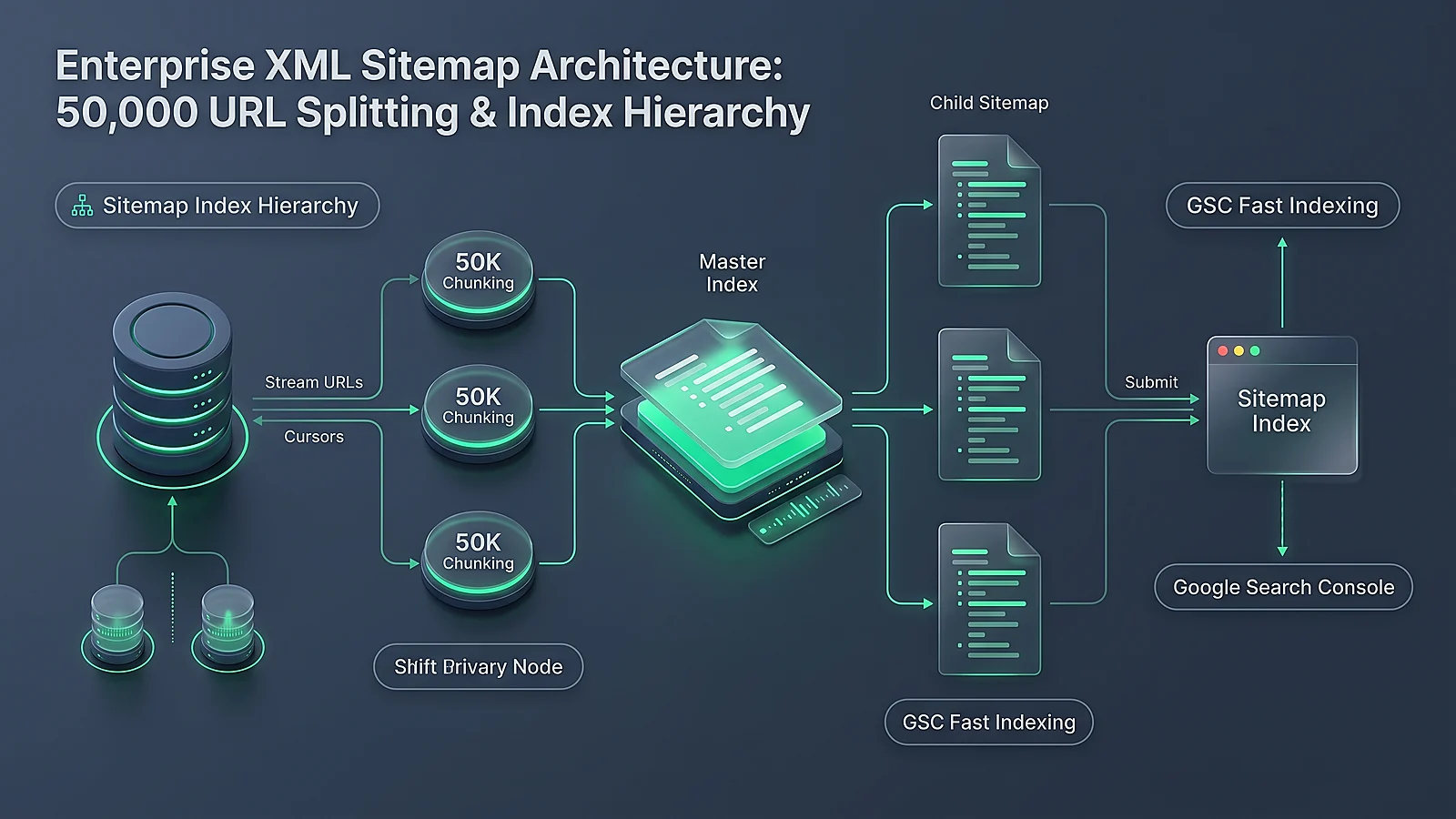
XML sitemaps serve as an explicit direct discovery protocol between your database and search engine crawlers. While small sites manage with a single static sitemap.xml file, enterprise platforms holding over 50,000 URLs must deploy a hierarchical Sitemap Index Architecture partitioned strategically to control crawl frequency and track indexation ratios by URL vertical.
Enterprise Sitemap Partitioning Blueprint
A single sitemap file is strictly limited by the Sitemaps.org protocol to 50,000 URLs or 50MB uncompressed. Beyond these limits, enterprise platforms must adopt clean segmentation:
- Segment by Content Type & Business Vertical: Maintain distinct sitemap files for product pages, category hubs, editorial blog posts, author profiles, and location pages.
- Segment by Update Cadence & Freshness: Create specialized sitemaps for high-velocity real-time content (updated multiple times daily) versus static archive pages (updated annually). High-frequency sitemaps receive accelerated Googlebot polling.
- Precision Last-Modified Timestamps: Only output the
<lastmod>tag when meaningful substantive content has changed. Falsifying lastmod timestamps to "trick" Googlebot into crawling unchanged pages leads to algorithmic suppression of sitemap trust. - Exclude Canonical Equivalents and Redirects: Every single URL included in an enterprise XML sitemap must return an HTTP 200 OK status code, be self-canonicalizing, and be fully indexable. Including 301 redirects, 404s, or noindexed URLs degrades sitemap efficiency and confuses crawl prioritization.
<?xml version="1.0" encoding="UTF-8"?>
<sitemapindex xmlns="http://www.sitemaps.org/schemas/sitemap/0.9">
  <!-- High-Priority Products (Updated Daily) -->
  <sitemap>
    <loc>https://example.com/sitemaps/products-active-tier1.xml</loc>
    <lastmod>2026-09-15T08:00:00+00:00</lastmod>
  </sitemap>
  <!-- Category Taxonomies and Pillar Hubs -->
  <sitemap>
    <loc>https://example.com/sitemaps/categories-canonical.xml</loc>
    <lastmod>2026-09-14T12:00:00+00:00</lastmod>
  </sitemap>
  <!-- Editorial Knowledge Base & Guides -->
  <sitemap>
    <loc>https://example.com/sitemaps/editorial-guides.xml</loc>
    <lastmod>2026-09-13T16:30:00+00:00</lastmod>
  </sitemap>
</sitemapindex>
Sitemap Index Coverage Analytics:
By segmenting sitemaps into distinct categories in Google Search Console, you can immediately identify which vertical has an indexation deficit. If your Product Sitemap shows 92% indexed while your Category Facet Sitemap shows only 14% indexed, you have mathematical proof that Googlebot perceives your facet pages as thin content or index bloat, pinpointing where architectural remediation is required.
Chapter 6: HTTP 304 Not Modified, ETag Validation, and Conditional GET Optimization
One of the most potent yet underutilized technical optimizations for enterprise crawl efficiency is the implementation of HTTP 304 Not Modified conditional headers. When Googlebot re-crawls an existing URL on your site, it should not download the entire HTML document if the content has not changed since the previous visit.
By configuring your web servers (Nginx, Apache, or Edge Cloudflare Workers) to support Conditional GET requests, Googlebot transmits an If-Modified-Since or If-None-Match header with its request. If the document has remained unchanged, your origin responds with a lightweight HTTP 304 Not Modified status code containing zero HTML body payload.
The Performance and Quota Multiplier
An HTTP 304 response typically measures under 1 kilobyte in headers alone, compared to 150KB–500KB for a full HTML DOM. This yields profound architectural benefits:
- Instant Server Response Time (<30ms): Edge CDNs resolve 304s from cache memory without touching database layers, drastically lowering Time to First Byte.
- Crawl Rate Limit Expansion: Because Googlebot's crawler encounters lightning-fast response times with near-zero latency, its autonomic systems elevate your domain's crawl rate limit.
- Re-Allocated Bandwidth: The compute capacity and network bandwidth saved from downloading unchanged pages is instantly re-allocated by Googlebot to discovering and indexing new URLs across your site.
ETag and Cache-Control Configuration Snippet (Nginx):
Ensure your Nginx configuration generates dynamic ETags and enables conditional GET verification:
etag on;
if_modified_since exact;
add_header Cache-Control "public, max-age=3600, must-revalidate";
Chapter 7: Server Access Log Analysis: Reverse-Engineering Googlebot Crawl Patterns
Google Search Console provides aggregated, delayed crawl summaries, but raw server access logs provide real-time, unvarnished truth. Every single time Googlebot requests a resource on your infrastructure, an immutable log entry is generated containing the timestamp, client IP address, HTTP method, requested URI, HTTP status code, user-agent string, and response duration in milliseconds.
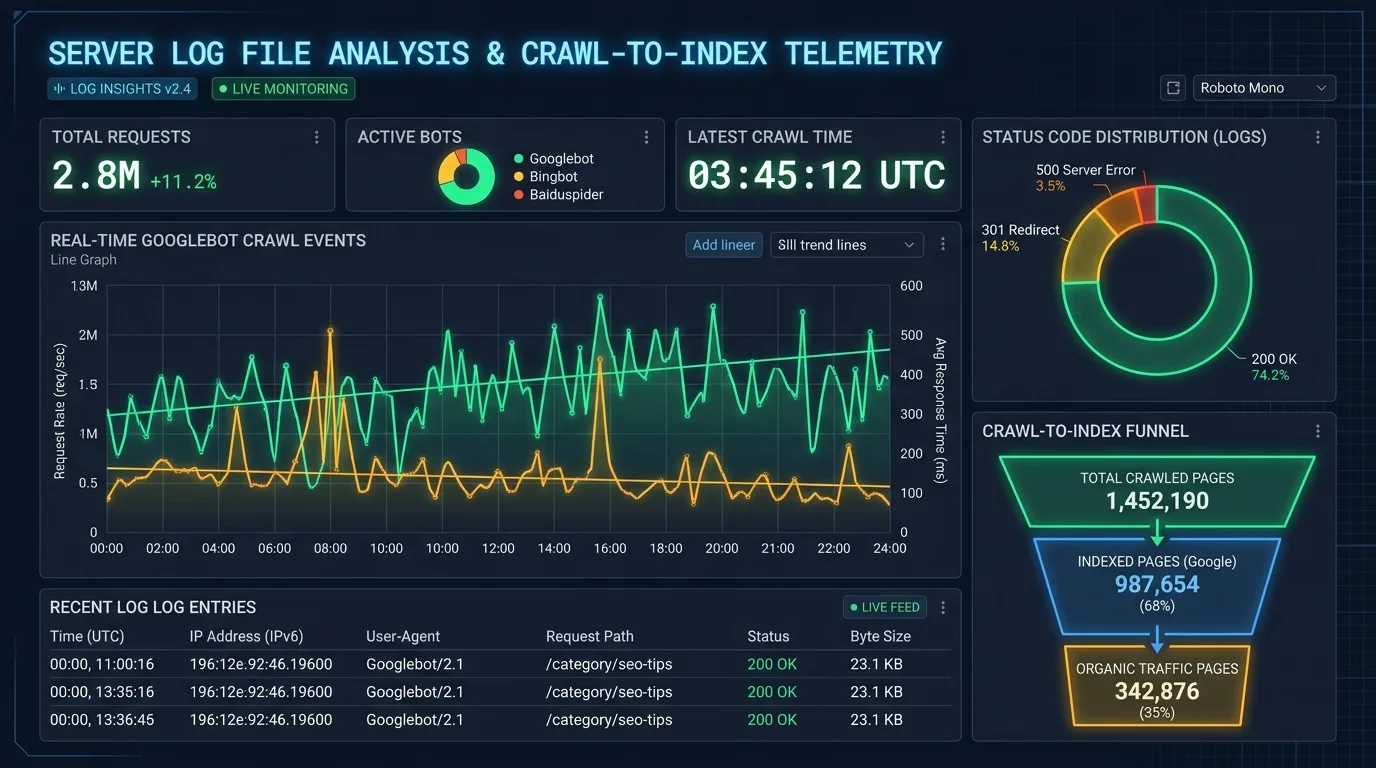
Figure 3: Server Access Log Analysis Dashboard — Telemetry Monitoring Real-Time Googlebot Crawl Events, HTTP Status Code Distributions, and Crawl-to-Index Conversion Funnels.
Verifying Legitimate Googlebot Crawlers
Before analyzing logs, you must filter out malicious scrapers and spoofed user agents pretending to be Googlebot. Never rely solely on the User-Agent string. Legitimate Googlebot requests must be validated using Reverse DNS Lookup verification: reverse DNS resolution of the client IP must match a domain ending in *.googlebot.com or *.google.com, followed by a forward DNS lookup matching the original IP address.
Automating Log Ingestion with Python
Enterprise teams use automated data pipelines to stream access logs into analytics warehouses. Here is a production Python script to parse access logs, verify bot authenticity, and calculate the crawl-to-status distribution:
# Enterprise Googlebot Log File Parser
import re
from collections import Counter
import pandas as pd

LOG_PATTERN = re.compile(
    r'(?P<ip>[\d\.:a-fA-F]+) - - \[(?P<time>[^\]]+)\] '
    r'"(?P<method>[A-Z]+) (?P<url>[^\s]+) [A-Z0-9/\.]+" '
    r'(?P<status>\d{3}) (?P<bytes>\d+) "[^"]*" "(?P<ua>[^"]*)"'
)

def parse_googlebot_logs(log_filepath: str) -> pd.DataFrame:
    records = []
    with open(log_filepath, 'r', encoding='utf-8') as f:
        for line in f:
            match = LOG_PATTERN.match(line)
            if not match:
                continue
            data = match.groupdict()
            # Filter for Googlebot user-agents
            if 'Googlebot' in data['ua']:
                records.append({
                    'ip': data['ip'],
                    'timestamp': data['time'],
                    'url': data['url'],
                    'status': int(data['status']),
                    'bytes': int(data['bytes'])
                })

    df = pd.DataFrame(records)
    print(f"Total Googlebot Hits: {len(df)}")
    print("Status Code Breakdown:")
    print(df['status'].value_counts(normalize=True) * 100)
    return df
By connecting this script to your centralized SEO analytics and log telemetry system in Google BigQuery, you can cross-examine daily crawl counts against organic ranking changes, proving the commercial impact of crawl optimization.

Chapter 8: The IndexNow Protocol: Transitioning from Reactive Polling to Event-Driven Push Indexing
Traditional search indexation relies on reactive polling: search engines crawl billions of known URLs on recurring schedules, hoping to catch content updates after they occur. For massive enterprise websites publishing thousands of daily updates, this model is inherently inefficient, introducing significant lag between publication and SERP visibility.
The IndexNow protocol, spearheaded by Microsoft Bing and supported by major global search engines and CDN providers (including Cloudflare), revolutionizes this architecture by introducing event-driven push indexation.
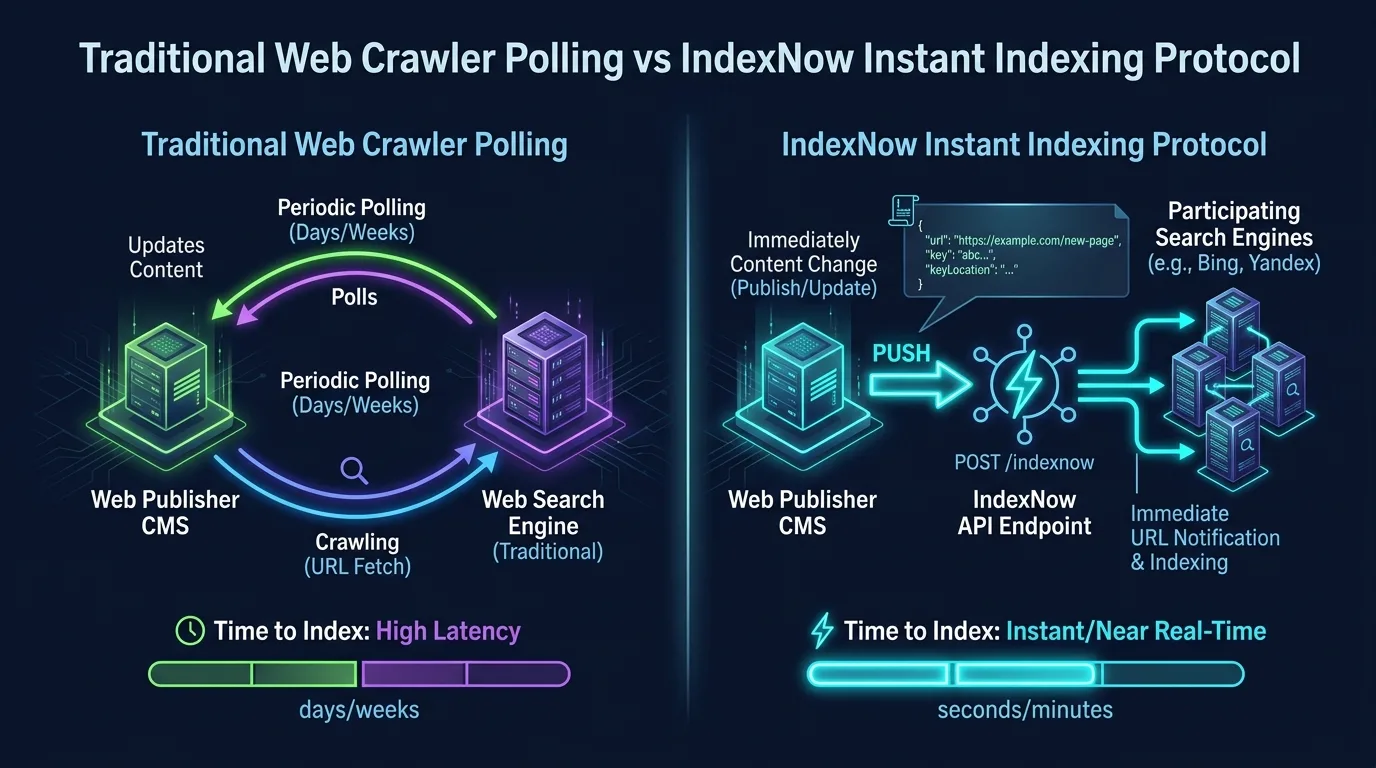
Figure 4: Traditional Web Crawler Polling vs. IndexNow Instant Indexing Protocol — Direct API Push Architecture Delivering Near Real-Time URL Discovery.
Implementing IndexNow at the Application Layer
Whenever a page is created, updated, or deleted within your CMS or database, an automated webhook immediately dispatches a lightweight JSON payload to the IndexNow API endpoint. A single API call notifies all participating search engines simultaneously, eliminating the need for crawlers to waste bandwidth polling unchanged pages.
// Node.js / Next.js IndexNow Push Dispatcher
import axios from 'axios';

export async function notifyIndexNow(updatedUrls: string[]) {
  const payload = {
    host: "example.com",
    key: process.env.INDEXNOW_API_KEY,
    keyLocation: "https://example.com/my-indexnow-key.txt",
    urlList: updatedUrls.slice(0, 10000) // Batches up to 10k URLs
  };

  try {
    const response = await axios.post('https://api.indexnow.org/indexnow', payload, {
      headers: { 'Content-Type': 'application/json; charset=utf-8' }
    });
    console.log(`IndexNow dispatched: ${response.status}`);
  } catch (error) {
    console.error('Failed to dispatch IndexNow notification', error);
  }
}
For scalable architectures that generate automated landing pages, integrating IndexNow with your programmatic SEO architecture guarantees that newly deployed URL matrices are crawled and indexed within minutes of deployment rather than lagging over several weeks.
Chapter 9: Building an Enterprise Crawl Hygiene Audit Workflow
Sustaining optimal crawl efficiency requires recurring governance and systematic operational cadences. Enterprise organizations should institutionalize a monthly 5-phase crawl hygiene audit workflow:
- Audit Log Status Codes (Week 1): Extract 30 days of server access logs. Identify the percentage of bot hits returning 4xx or 5xx status codes. Any endpoint consuming more than 1% of total crawl requests while returning non-200/304 codes must be patched immediately.
- Sanitize Internal Redirect Chains (Week 2): Run an automated crawl of your entire internal link graph using Python SEO automation scripts. Rewrite database entries to ensure all internal links point directly to destination 200 OK canonicals, eliminating all 301 and 302 intermediary hops.
- Verify Parameter Disallow Enforcement (Week 3): Check Google Search Console Crawl Stats report. Review "By Purpose" and "By File Type". If HTML page crawling exceeds image/script rendering requests by disproportionate ratios, inspect query strings for newly introduced unmanaged parameters.
- Sitemap Index Reconciliation (Week 4): Compare URLs present in XML sitemaps against URLs crawled in server logs. Pages present in sitemaps that have not been crawled in over 60 days indicate severe internal link architecture isolation or algorithmic depreciation.
- Implement Entity Disambiguation via Structured Data (Ongoing): Ensure all canonical pages contain robust, validated JSON-LD schema markup so that search bots can parse entity relationships directly without expensive heuristic DOM parsing.
Preserving Internal Link Equity:
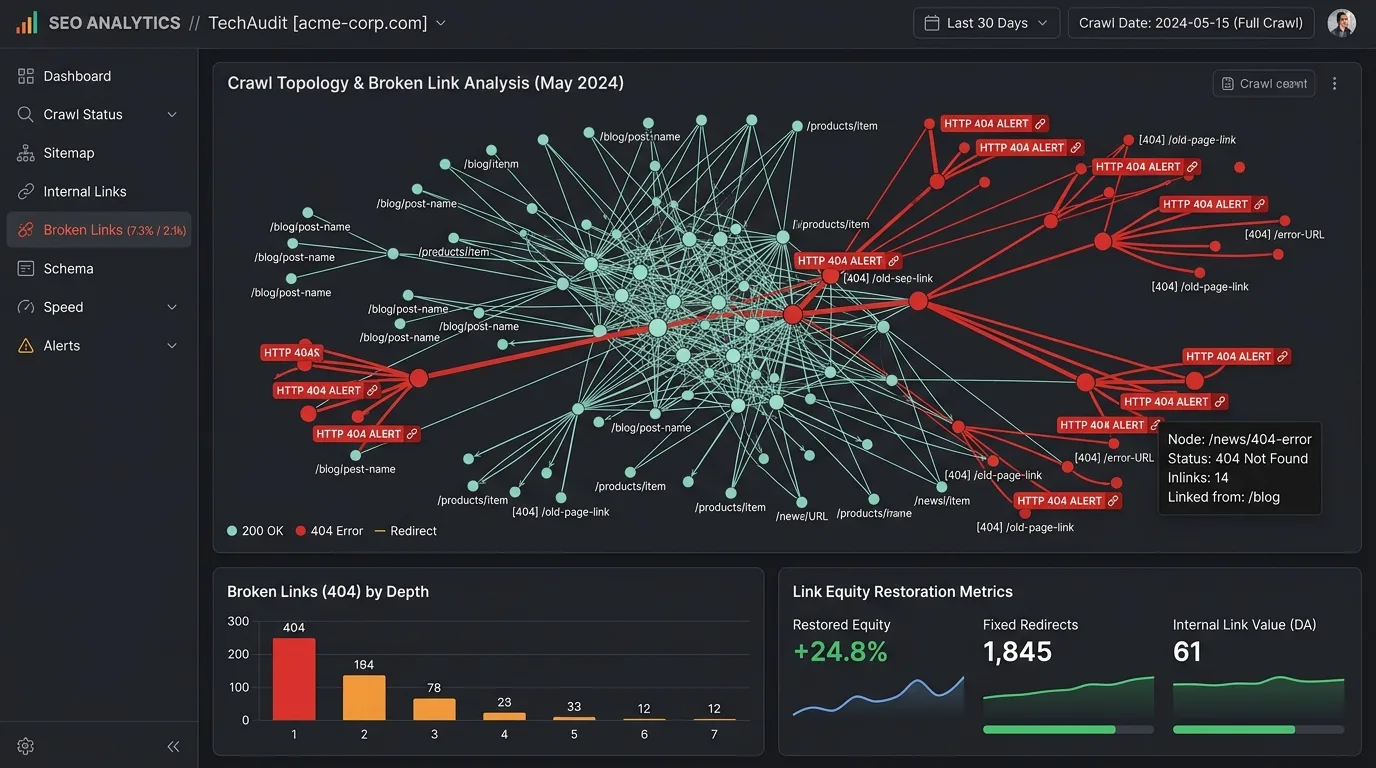
Never isolate low-performing URLs by simply orphaning them from your navigation. Pages without incoming internal links suffer complete PageRank starvation. Always reinforce crawl paths through disciplined broken link detection and redirect hygiene across all website sections.


Ratings & reviews
No reviews yet. Be the first.