

Faceted navigation is the lifeblood of modern e-commerce user experience. It empowers shoppers to seamlessly refine massive product catalogs across sizes, colors, brands, technical specifications, and price brackets. Yet, beneath this sleek commercial convenience lies the single most destructive architectural vulnerability in enterprise SEO: combinatorial URL inflation. Without rigorous governance, a catalog of 10,000 products can spawn over 50,000,000 crawlable URL variations, paralyzing search engine crawlers, devouring server bandwidth, and dissolving PageRank equity.
Allowing search engines unconstrained access to faceted filter URLs is the fastest way to trigger algorithmic quality downgrades. When Googlebot spends 90% of its host crawl budget processing near-duplicate filtered permutations (e.g., sort order, price ranges, and multi-select checkboxes), your high-margin category hubs and high-converting product pages remain un-crawled, unindexed, and commercially invisible.
1. The Faceted Navigation Dilemma: UX Convenience vs SEO Crawl Catastrophe
In modern e-commerce design, user retention is directly correlated with discovery velocity. Online shoppers expect immediate, responsive filtering capabilities: selecting "Men's Running Shoes," narrowing by "Size 10.5," checking "Waterproof," toggling "Under $150," and sorting by "Highest Rated." Each click mutates the application state and dynamically adjusts the visible product grid.
For search crawlers, however, each filter interaction represents a potential new URL. When websites generate static hyperlinked anchor tags (<a href="?size=10.5&color=blue">) for every filter facet, crawlers interpret each link as an invitation to index a distinct document. The resulting tension between user experience requirements and search engine indexing mechanics is the core challenge of technical e-commerce SEO.
The solution is not to eliminate faceted navigation, but to build an intelligent hybrid crawl barrier that provides human shoppers with rich client-side interactivity while presenting search bots with a clean, deterministic, and highly curated topical taxonomy. As detailed in our pillar guide on the ultimate e-commerce SEO playbook, enterprise organic growth depends on harvesting high-intent long-tail search demand without sacrificing crawl health.

2. Combinatorial URL Explosion: The Mathematics of Crawl Budget Destruction
To grasp why faceted navigation causes such catastrophic crawl bloat, consider the underlying mathematics of combinatorics. Let us examine a modest e-commerce category page featuring 5 standard filter dimensions:
- Brand: 20 options
- Size: 12 options
- Color: 10 options
- Price Tier: 5 brackets
- Sort Order: 4 variations (Price Low-to-High, High-to-Low, Newest, Popularity)
The number of possible URL permutations generated by combining these facets is calculated using combinatorial summation:
$$ ext{Total Permutations} = (1 + 20) imes (1 + 12) imes (1 + 10) imes (1 + 5) imes (1 + 4) - 1 = (21 imes 13 imes 11 imes 6 imes 5) - 1 = 90,089 ext{ URLs}$$
From a single category page, your application has engineered over 90,000 distinct URLs. If your online store features 300 subcategories, your total potential crawl universe balloons to over 27,000,000 URLs—the vast majority of which display nearly identical product inventories with minor variations in order or styling.
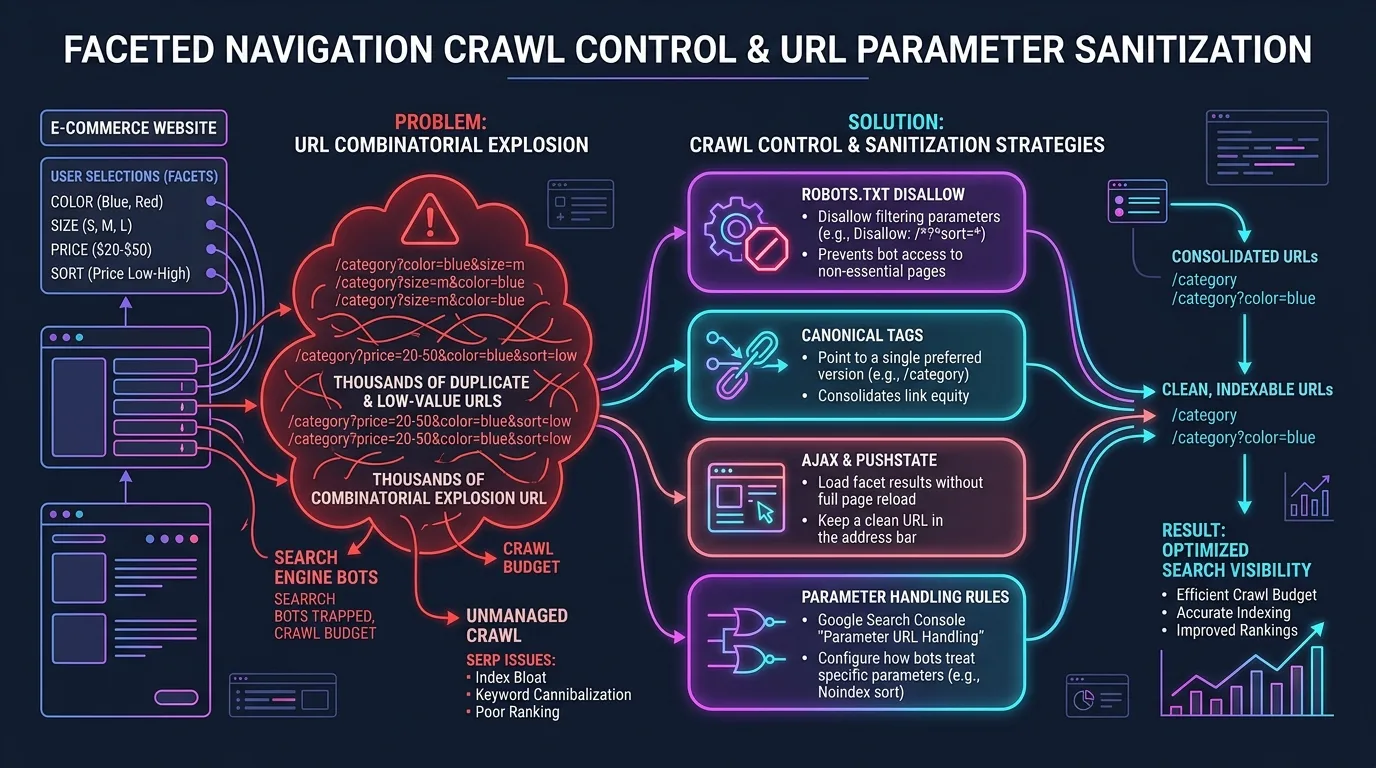
When Googlebot encounters this infinite labyrinth of parameters, three disastrous consequences unfold:
- Crawl Budget Exhaustion: Googlebot allocates a finite number of HTTP requests per day based on host latency and domain authority. Permutation bloat consumes these requests on worthless query strings, preventing new products and editorial guides from being discovered.
- Severe Duplicate Content Dilution: Thousands of URLs share 95%+ identical HTML text, heading structures, and product descriptions. Google's quality algorithms categorize the domain as having high ratios of low-value, thin content.
- PageRank Dissipation: Incoming link equity from external press and backlinks is diffused across millions of internal parameter URLs instead of concentrating on authoritative revenue-driving category hubs.
3. Canonicalization vs Noindex vs Robots.txt: Choosing the Correct Defensive Weapon
Technical SEO teams often debate the best technical mechanism for controlling faceted navigation. Amateurs attempt to solve the issue with a single blunt instrument; enterprise architects deploy a multi-layered defense matrix tailored to crawl economics.
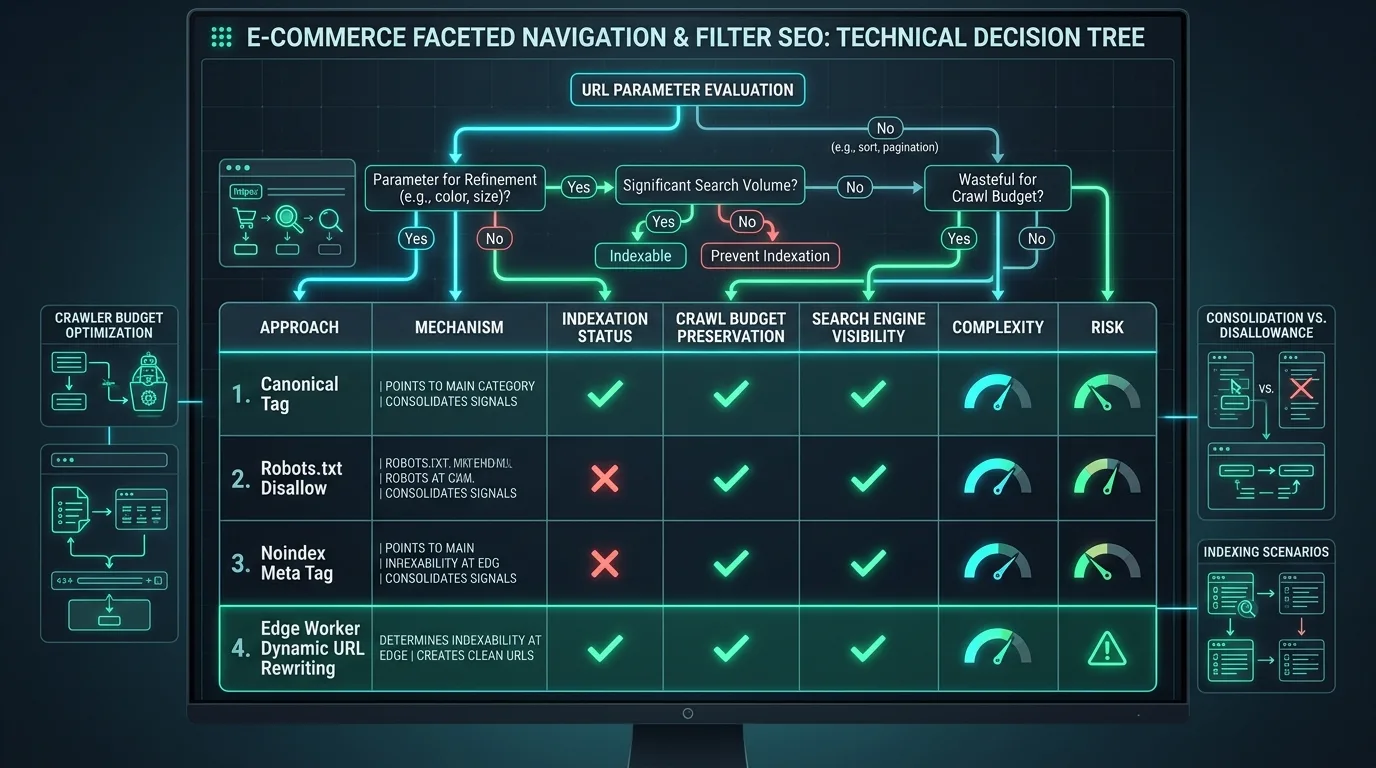
| Defensive Mechanism | Crawl Budget Impact | Indexation Impact | Link Equity Flow | Optimal Architectural Use Case |
|---|---|---|---|---|
| Rel="canonical" to Root Category | Negative (Crawlers still request the URL to discover the tag) | Positive (Consolidates ranking signals to root hub) | Preserved and channeled to canonical target | Sort order, pagination variants, minor display toggles, single-facet filter variants with low search volume. |
| Meta "noindex, follow" Tag | Severely Negative (Forces crawlers to fetch and render the entire page) | Positive (Removes URL from index completely) | Eventually stops passing PageRank when treated as nofollow | Deprecated for faceted filtering. High server cost with zero crawl budget protection. |
| Robots.txt Disallow Directives | Extremely Positive (Instantly halts crawler requests) | Neutral (URLs can still index if linked externally) | Completely blocks equity transfer across disallowed paths | Deep multi-facet combinations, price slider brackets, session IDs, internal tracking parameters. |
| AJAX / pushState (Client-Side Rendering) | Pristine (Zero crawlable HTML links generated) | Complete Control (Search engines never see the URL state) | Retains 100% of internal PageRank on canonical URLs | Interactive multi-select filters, user preference sliders, and non-commercial utility sorting. |
Never combine robots.txt Disallow with rel="canonical" on the same URL! If Googlebot is disallowed from crawling a URL via robots.txt, it cannot read the HTML document to discover the canonical tag. The two directives cancel each other out, leaving the parameter URL stranded in an ambiguous state.
For high-scale e-commerce platforms, preserving crawl budget is paramount. For an exhaustive methodology on optimizing server resources and log telemetry, read our operational guide on technical crawl budget optimization at scale.

4. Dynamic Parameter Clean-Up: Sorting, Pagination, and View Modes
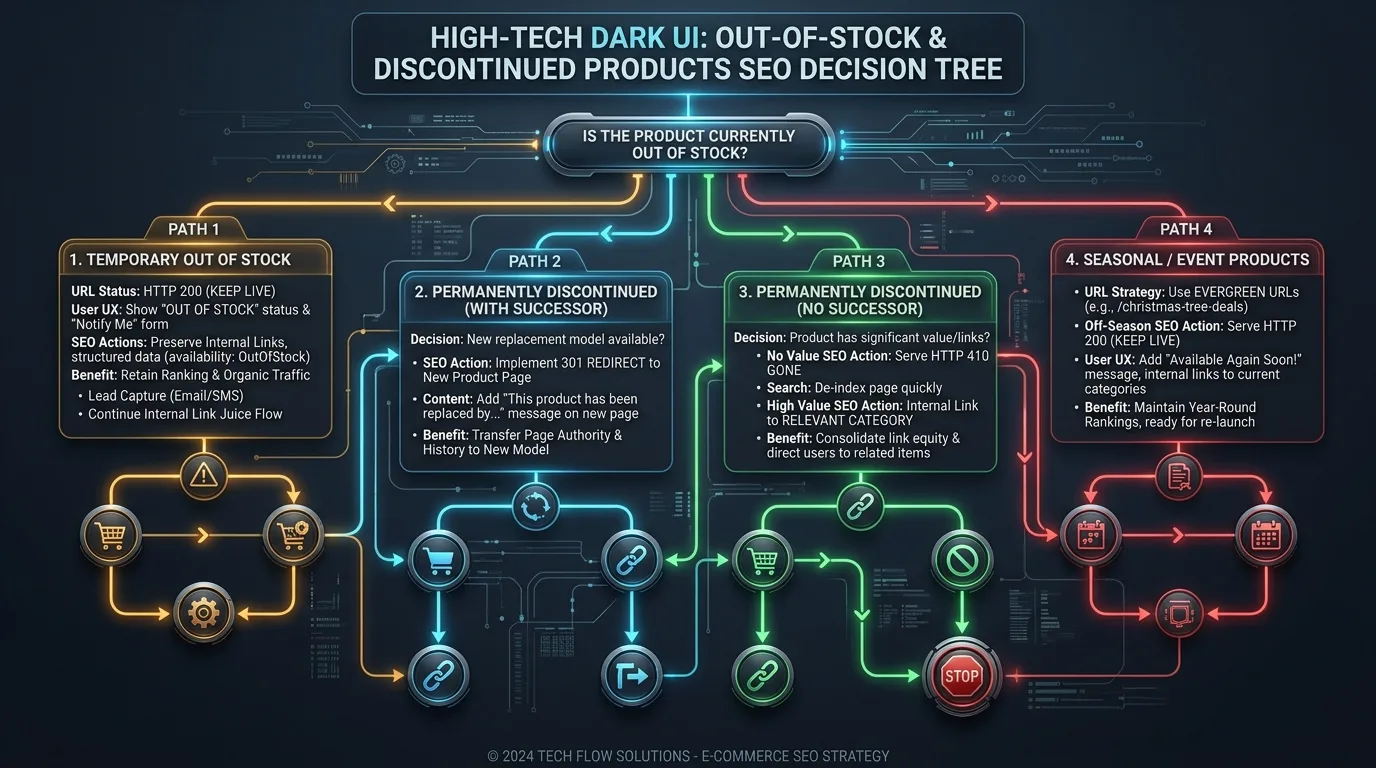
Not all URL parameters are created equal. In faceted navigation, parameters fall into three distinct functional categories: Content Modifiers (which change which products appear), Display Modifiers (which alter the visual presentation without changing inventory), and Tracking Tokens (used purely for analytics).
Rules for Display Modifiers
Display parameters such as ?sort=price_asc, ?view=grid, ?limit=48, or ?currency=EUR never deserve unique indexation. They represent pure duplicate content. Handle them through two complementary strategies:
- Client-Side State via Hash Fragments: For pure visual adjustments, store state in URL hash fragments (e.g.,
https://example.com/shoes#sort=price_asc). Search engines ignore everything after the#hash symbol, preventing parameter URL generation entirely. - Self-Referencing Canonical Fallback: When query parameters must be used for server-side caching, ensure the HTML contains an ironclad
rel="canonical"pointing strictly back to the base clean URL (https://example.com/shoes).
5. The Indexation Sweet Spot: Harvesting Long-Tail Commercial Search Demand
While uncontrolled faceted navigation causes crawl destruction, totally blocking all filtered pages is equally tragic. It forfeits thousands of high-converting, high-intent commercial search queries.
Consider the query: "Women's Red Running Shoes". This is not a broad primary category; it is a multi-facet combination: Category (Shoes) + Gender (Women's) + Color (Red) + Type (Running). Users searching this exact phrase are at the bottom of the purchase funnel with extraordinary purchase intent.
The Facet Indexation Policy Matrix
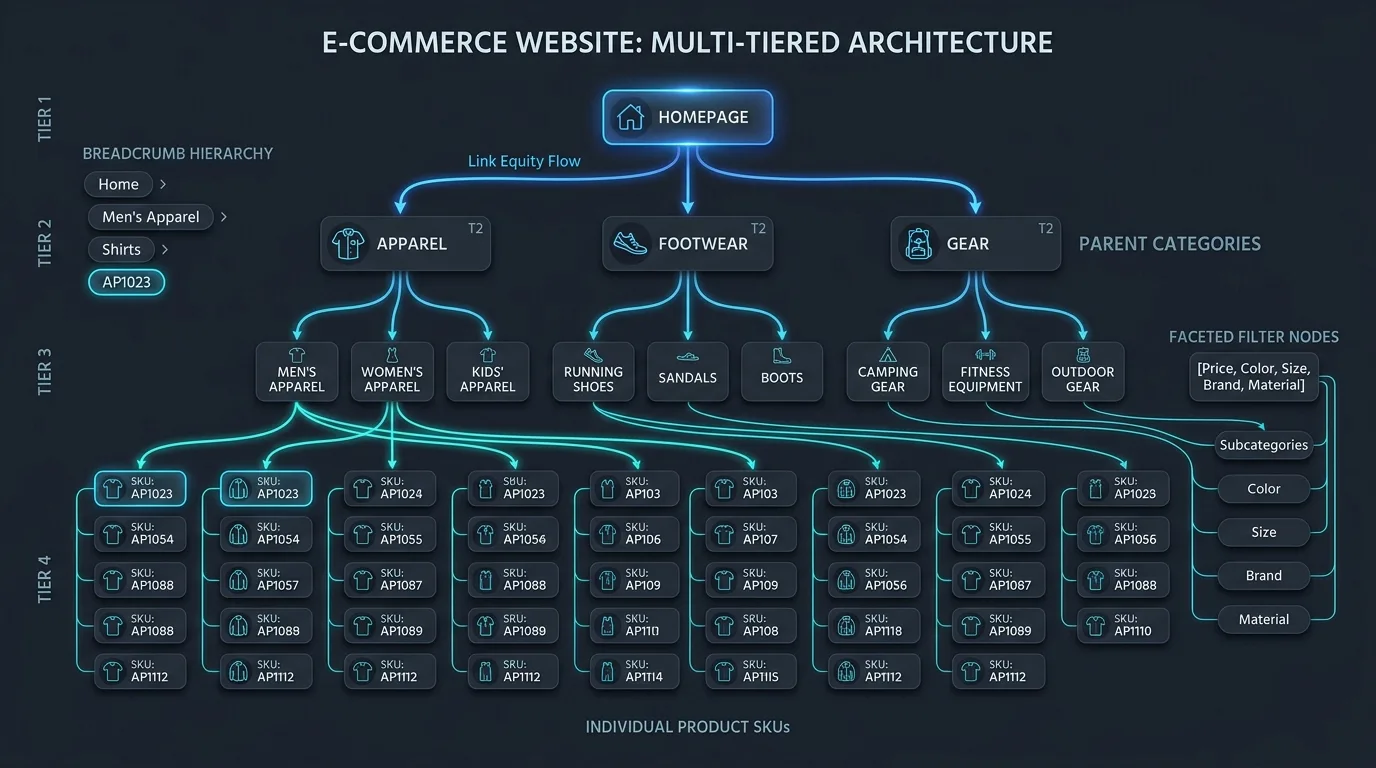
Establish an automated data pipeline that evaluates search demand before deciding whether a faceted page should be indexed:
| Facet Permutation Type | Monthly Search Volume | Catalog Inventory Depth | Architectural Action | Target URL Structure |
|---|---|---|---|---|
| Single High-Demand Facet (e.g., Brand or Color) | High (1,000+ searches/mo) | $\ge 10$ unique in-stock SKUs | Elevate to Indexable Subcategory (Clean static URL, custom H1, self-canonical) | /shoes/nike/ or /shoes/red/ |
| Dual High-Intent Facet (e.g., Brand + Color) | Moderate (200–999 searches/mo) | $\ge 5$ unique in-stock SKUs | Indexable Programmatic Hub (Clean static URL, automated breadcrumbs) | /shoes/nike/red/ |
| Low-Demand Facet (e.g., Specific Size or Material) | Low (< 50 searches/mo) | Any inventory count | Canonicalize to Parent Category (Keep crawlable, canonical to root) | /shoes?size=10-5 $
ightarrow$ Canonical to /shoes/ |
| Multi-Facet Combinations (3+ facets checked) | Near Zero (Long-tail noise) | < 3 products | Block Crawlers via Robots.txt / AJAX (No index, no crawl) | Handled via client-side JavaScript pushState |
| Dynamic Sliders (e.g., Price or Distance) | Zero search intent | Variable | Block Crawlers via Robots.txt | Disallowed parameter in robots.txt |
For engineering teams generating thousands of programmatic e-commerce landing pages based on search demand, review our architectural blueprint on programmatic SEO for SaaS and marketplaces.
6. Client-Side Rendering vs AJAX pushState Architecture for Filter State
The definitive enterprise standard for modern faceted navigation is the AJAX + HTML5 History API (pushState) Architecture. This model provides the ultimate decoupling: human users experience instant, buttery-smooth filtering without full page reloads, while search bots interact only with static, curated links.
How the AJAX pushState Pattern Operates
- When a human user clicks a filter checkbox (e.g., "Size 10.5"), an event listener intercepts the click, preventing a standard browser navigation event.
- An asynchronous
fetch()request queries the backend API for updated product IDs matching the active filter criteria. - The client-side DOM updates the product grid in-place without refreshing the header, navigation, or footer.
- The script invokes
window.history.pushState()to update the browser URL bar to/shoes?size=10.5, allowing users to bookmark or share the filtered view. - The Critical SEO Separation: The filter checkbox itself is rendered as a standard HTML
<input type="checkbox">or<button>element—never as an<a href="...">hyperlink. Because search crawlers do not click buttons or execute arbitrary form inputs, Googlebot never discovers or follows the parameter URL.
For high-demand facets that should be indexed (such as top brands), the navigation displays an explicit semantic <a href="/shoes/nike"> link. Googlebot follows this link to the pre-rendered, server-side generated subcategory page, while ignoring the non-hyperlinked filter options.
To implement this in modern frameworks like React and Next.js, review our guide on Next.js App Router SEO and dynamic routing architectures.

7. Handling Internal PageRank Dilution Across Millions of Filter Links
Internal linking is the primary mechanism through which search engines calculate the relative importance of pages across a website. When a category page includes 150 faceted filter links in its sidebar, that single page is dividing its outgoing PageRank into 150 diluted micro-streams.
Over a multi-million-page e-commerce architecture, this dilution starves your core commercial assets. To conserve and channel PageRank equity:
- Eliminate Multi-Select Facet Links: When a user selects "Nike," do not make the remaining brand checkboxes clickable links that point to
/shoes/nike+adidas. Multi-brand combination pages dilute topical focus and cannibalize single-brand authority. - Implement PR Sculpting via Button Elements: By rendering non-indexable filter toggles as semantic
<button>elements styled with CSS, you retain 100% of the page's outgoing PageRank for the canonical links present in the primary navigation, breadcrumbs, and product grid. - Clean Pagination Links: Ensure pagination links use clean, predictable paths (e.g.,
/shoes?page=2) with self-referencing canonicals or canonicals pointing to the root category depending on your catalog depth strategy. Never allow pagination to multiply across faceted parameter strings (e.g.,/shoes?color=red&size=10&page=4).
8. Schema.org Implementation for Filtered Collection and Category Hubs
When you elevate high-demand faceted pages into indexable category landing pages, you must reinforce their semantic validity with structured data. Google requires explicit structured data to understand the relationship between category collections and individual product entities.
JSON-LD Implementation for an Elevated Faceted Hub
Notice how this markup combines CollectionPage, BreadcrumbList, and an ItemList displaying the top products currently available in this specific facet collection:
{
  "@context": "https://schema.org",
  "@graph": [
    {
      "@type": "CollectionPage",
      "@id": "https://example.com/shoes/running/red/#webpage",
      "url": "https://example.com/shoes/running/red",
      "name": "Women's Red Running Shoes - 2026 Collection",
      "description": "Explore our curated collection of women's red running shoes. Featuring high-cushion road racers, trail trainers, and lightweight track footwear.",
      "breadcrumb": {
        "@id": "https://example.com/shoes/running/red/#breadcrumb"
      },
      "mainEntity": {
        "@type": "ItemList",
        "numberOfItems": 24,
        "itemListElement": [
          {
            "@type": "ListItem",
            "position": 1,
            "url": "https://example.com/products/aerofly-speed-red",
            "name": "AeroFly Speed Racer - Crimson Red"
          },
          {
            "@type": "ListItem",
            "position": 2,
            "url": "https://example.com/products/trail-blazer-gtx-red",
            "name": "TrailBlazer GTX Waterproof - Flame Red"
          }
        ]
      }
    },
    {
      "@type": "BreadcrumbList",
      "@id": "https://example.com/shoes/running/red/#breadcrumb",
      "itemListElement": [
        {
          "@type": "ListItem",
          "position": 1,
          "name": "Home",
          "item": "https://example.com"
        },
        {
          "@type": "ListItem",
          "position": 2,
          "name": "Shoes",
          "item": "https://example.com/shoes"
        },
        {
          "@type": "ListItem",
          "position": 3,
          "name": "Running",
          "item": "https://example.com/shoes/running"
        },
        {
          "@type": "ListItem",
          "position": 4,
          "name": "Red Running Shoes",
          "item": "https://example.com/shoes/running/red"
        }
      ]
    }
  ]
}
By providing explicit BreadcrumbList schema, you clarify the hierarchical parentage of the faceted page, ensuring Google positions it accurately within the broader site architecture.
9. Real-World Audit Protocol: Identifying Faceted Crawl Traps in Server Logs and GSC
How do you verify whether your faceted navigation is actively hemorrhaging crawl budget? You must cross-examine data from two primary telemetry sources: Server Access Logs and Google Search Console (GSC).
Step 1: GSC Index Coverage Inspection
Navigate to the Pages report in Google Search Console. Filter the exclusion reasons by:
- Crawled - currently not indexed: If this category contains tens of thousands of URLs containing query strings (
?), Googlebot is crawling your filter permutations but rejecting them from the index due to low quality. This is conclusive proof of crawl budget waste. - Duplicate without user-selected canonical: Indicates that Googlebot discovered parameterized filter URLs where your canonical tags were missing, broken, or disregarded.
- Discovered - currently not indexed: Shows that Googlebot found millions of parameter URLs via internal links but lacks the crawl capacity to fetch them.
Step 2: Server Log Analysis with Python
Execute an automated log parsing script against your NGINX or Apache access logs to quantify exactly what percentage of Googlebot requests target parameter URLs vs clean canonical pages:
import re
from collections import Counter

def audit_googlebot_crawl_logs(log_filepath: str):
    googlebot_pattern = re.compile(r'Googlebot/\d+\.\d+')
    url_pattern = re.compile(r'"GET\s+([^\s]+)\s+HTTP')

    total_googlebot_hits = 0
    parameter_hits = 0
    clean_hits = 0
    parameter_breakdown = Counter()

    with open(log_filepath, 'r', encoding='utf-8') as f:
        for line in f:
            if googlebot_pattern.search(line):
                total_googlebot_hits += 1
                match = url_pattern.search(line)
                if match:
                    uri = match.group(1)
                    if '?' in uri:
                        parameter_hits += 1
                        # Extract the query parameters
                        query_string = uri.split('?')[1]
                        params = [p.split('=')[0] for p in query_string.split('&') if '=' in p]
                        for p in params:
                            parameter_breakdown[p] += 1
                    else:
                        clean_hits += 1

    print(f"Total Googlebot Requests: {total_googlebot_hits}")
    print(f"Clean Canonical URLs: {clean_hits} ({(clean_hits / total_googlebot_hits) * 100:.1f}%)")
    print(f"Parameterized URLs: {parameter_hits} ({(parameter_hits / total_googlebot_hits) * 100:.1f}%)")
    print("
Top 5 Worst Offending Filter Parameters:")
    for param, count in parameter_breakdown.most_common(5):
        print(f"  ?{param}: {count} crawl requests")

if __name__ == "__main__":
    # Example execution against access log
    audit_googlebot_crawl_logs("/var/log/nginx/access.log")
If your audit reveals that parameterized URLs account for more than 15% of total Googlebot crawl volume, you must immediately implement robots.txt parameter disallow rules or refactor filter clicks to AJAX buttons.
10. Frequently Asked Questions
Explore authoritative answers to common enterprise questions regarding faceted navigation, e-commerce crawl management, and filter canonicalization.
What is the single best way to handle faceted navigation for SEO?
The enterprise gold standard is a hybrid architecture: use client-side AJAX with HTML5 pushState for interactive user filtering (rendering non-indexable options as buttons rather than anchor links), while elevating high-demand keyword combinations (e.g., top brands, primary colors) into permanent, indexable, server-rendered subcategory pages with clean static URLs and self-referencing canonicals.
Why shouldn't I just put 'noindex, follow' on all my filter URLs?
Because meta noindex requires Googlebot to crawl and render every single page in order to discover the tag. On a site with millions of filter permutations, using noindex completely destroys your crawl budget. Furthermore, Google has confirmed that long-term noindex pages eventually stop passing link equity through their outgoing links, effectively converting them into nofollow links.
Can I use rel="canonical" to solve faceted navigation issues?
Rel="canonical" is effective for consolidating ranking signals from near-identical pages (such as sorting variations or minor view toggles) back to the root category. However, it does not save crawl budget, because Googlebot must still download the HTML to inspect the canonical tag. For deep combinatorial filters, pair canonicalization with robots.txt disallows or AJAX state handling.
How should I handle faceted navigation in robots.txt?
Disallow specific non-commercial parameters while leaving clean paths open. For example: Disallow: /*?*price= or Disallow: /*?*sort=. Always test directives in Google Search Console's robots.txt tester to ensure you don't inadvertently block essential CSS, JavaScript, or valuable indexable subcategories.
What happens if a user selects multiple filters from the same facet (e.g., Brand: Nike AND Adidas)?
Multi-select combinations within the same facet should never be indexable. They create topical ambiguity and rarely match natural search intent. Handle multi-select options purely client-side via JavaScript without generating crawlable HTML anchor tags.
How do I know which faceted combinations have enough search volume to justify indexing?
Conduct keyword research using tools like Semrush, Ahrefs, and Google Search Console search term queries. Benchmark search volume against catalog depth: only elevate a facet combination to an indexable page if the keyword generates at least 100 to 250 monthly searches AND your inventory contains at least 5 to 10 in-stock, unique products in that bucket.
Does Google still use the URL Parameters Tool in Search Console?
No. Google officially retired the legacy URL Parameters Tool in 2022. Today, Google relies entirely on automated crawling heuristics, robots.txt directives, canonical tags, and on-page HTML signals to determine how parameters should be handled.
Should faceted URLs be included in XML sitemaps?
Only elevated, canonical, indexable landing pages with clean static URLs should ever appear in XML sitemaps. Never include parameterized filter URLs, sorting variations, or canonicalized pages in your sitemap. Doing so sends conflicting indexing signals to search engines.
What is the difference between trailing slashes and parameter filters in crawl efficiency?
Both cause duplication if inconsistent. Ensure your application enforces strict 301 redirects to a singular canonical formatting rule (e.g., always enforce trailing slash or no trailing slash, and lowercase all query parameters) before parameters are processed.
How does faceted navigation impact Core Web Vitals (INP and LCP)?
Poorly optimized faceted navigation severely harms Interaction to Next Paint (INP). If filter clicks trigger massive, un-debounced client-side JavaScript recalculations that freeze the main browser thread, users experience high latency. Use debounced inputs, web workers for client-side sorting, and CSS skeleton screens to maintain sub-200ms INP responsiveness.

Ratings & reviews
No reviews yet. Be the first.