

Building search-optimized web applications with modern JavaScript frameworks has historically required uncomfortable architectural compromises. For years, engineering teams struggled with heavy client-side bundles, hydration delays, and the dreaded two-wave indexing lag of Google's Web Rendering Service (WRS). The introduction of the Next.js App Router—built natively on React Server Components (RSC)—fundamentally redefines the boundaries of technical search optimization. By executing component rendering on the server by default and streaming pure, pre-rendered semantic HTML to edge nodes, Next.js allows developers to achieve sub-millisecond Time to First Byte (TTFB), flawless first-pass crawlability, and dynamic metadata generation at enterprise scale.
getServerSideProps or getStaticProps was restricted to top-level page components. In the App Router, every React Server Component in the component tree can independently fetch data asynchronously without shipping a single byte of JavaScript to client browsers, guaranteeing instantaneous Googlebot indexation.1. The Evolution of React SEO: Why App Router Changed the Paradigm
The history of React SEO has been defined by a constant battle between developer ergonomics and search engine discovery. Traditional Single Page Applications (SPAs) required search crawlers to download large bundle files, construct the virtual DOM, and execute asynchronous API requests before rendering content. Even with Googlebot's modern Chromium rendering pipeline, this process introduces significant queue latency, causing newly published pages to sit unindexed for days or weeks.
The Next.js App Router eliminates this bottleneck through three foundational architectural shifts:
- Server Components as the Universal Default: Components inside the
app/directory execute exclusively on the server unless explicitly annotated with the'use client'directive. Their dependencies remain on the server, resulting in zero client JavaScript payload for informational layouts, articles, and navigation trees. - Streaming Server-Side Rendering (SSR): Powered by HTTP chunked transfer encoding, Next.js streams completed HTML segments to the crawler immediately while slower database queries resolve asynchronously inside React Suspense boundaries.
- Colocated Metadata and Route Handlers: SEO-critical configurations—including metadata, OpenGraph images, robots rules, and dynamic XML sitemaps—are defined natively via convention-based file exports rather than manual third-party head plugins.
The following architectural schematic illustrates how incoming user and search engine crawler requests traverse the Next.js App Router server, execute Server Components, and stream static HTML directly into edge discovery pipelines.
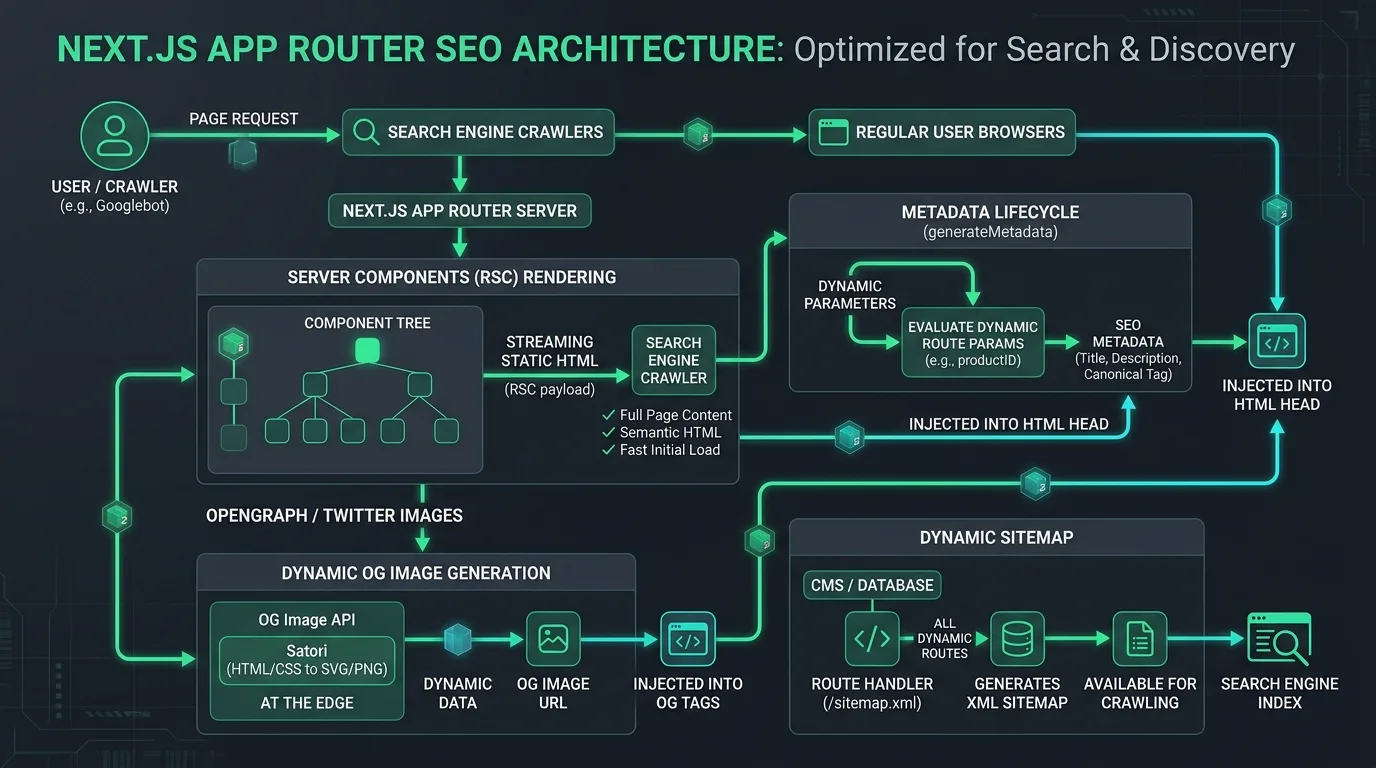
Figure 1: High-throughput Next.js App Router SEO architecture streaming server-rendered HTML and dynamic metadata to search crawlers.
Understanding these server-side execution patterns is closely tied to solving the broader rendering challenges analyzed in our definitive guide to JavaScript SEO and hydration.
2. React Server Components (RSC) vs. Client Components: The Indexation Advantage
In modern Next.js development, the distinction between React Server Components (RSC) and Client Components is the single most critical factor dictating organic crawl efficiency. While Client Components are necessary for interactive elements—such as dropdown menus, modal dialogs, and form inputs—they incur client-side execution overhead.
Server Components, by contrast, render entirely on the server into a specialized React Server Component payload (RSC payload) and raw HTML byte streams. When Googlebot or Bingbot requests a URL, it receives pristine semantic markup without waiting for client-side JavaScript initialization.
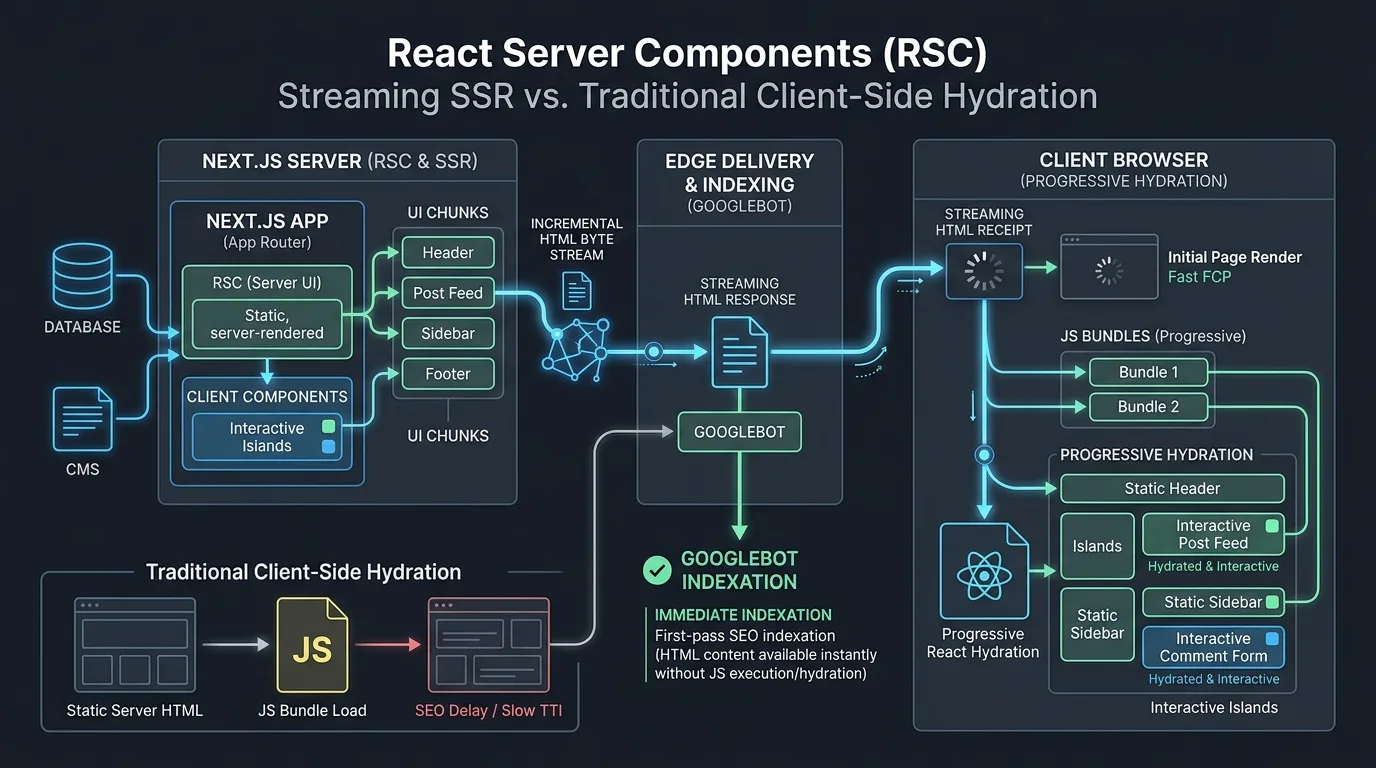
Figure 2: Streaming SSR lifecycle demonstrating immediate first-pass Googlebot indexation compared to delayed client-side hydration.
To maximize technical SEO performance across your component tree, apply the Island Architecture Principle:
- Keep Layouts, Copy, and Internal Links in Server Components: All editorial text, heading structures (H1-H6), image tags, and anchor links (
<Link>) must reside within Server Components. - Push
'use client'to the Furthest Leaf Nodes: If a button requires anonClickhandler or an accordion requires toggle state, isolate that specific interactive widget into a small Client Component leaf node, wrapping it inside a Server Component parent. - Leverage React Suspense for Non-Critical Blocks: Wrap slow-loading modules (such as personalized recommendations or customer review feeds) inside
<Suspense fallback=...>boundaries, allowing Googlebot to receive the core article text in the initial HTTP response packet.
3. Dynamic Metadata Architecture: The `generateMetadata` Lifecycle
The legacy practice of injecting title tags and meta descriptions using next/head has been completely replaced in the App Router by the native Metadata API. Next.js provides two complementary mechanisms for managing document head tags: static metadata configuration and dynamic metadata generation.
For dynamic routes—such as programmatic landing pages, product pages, and blog posts—the generateMetadata function fetches necessary data server-side and constructs the complete HTML <head> before the response is sent to the client.
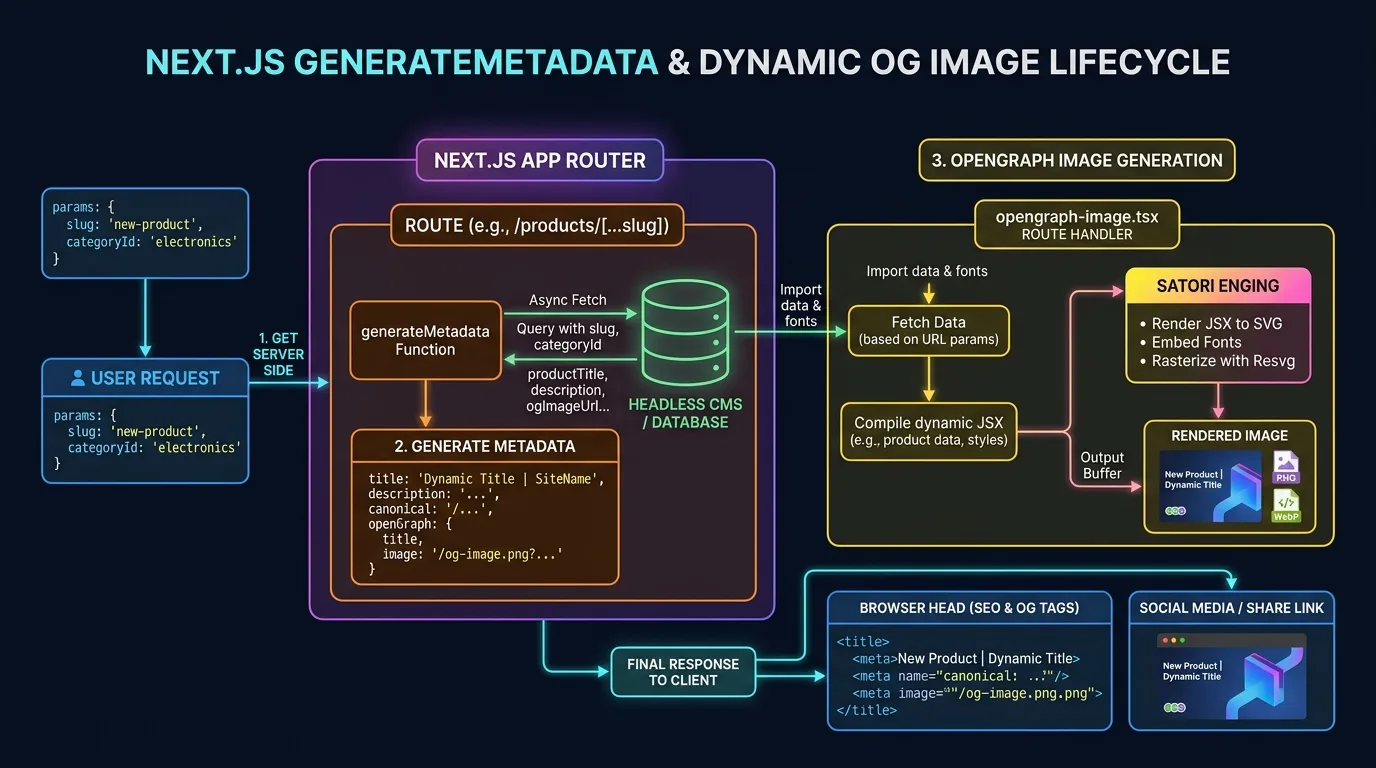
Figure 3: Next.js generateMetadata lifecycle querying databases and dynamically streaming meta tags and OpenGraph assets.
Consider the following production-grade implementation of a dynamic blog post route (app/blog/[slug]/page.tsx) demonstrating async metadata generation, self-referencing canonical URLs, and OpenGraph tags:
import type { Metadata, ResolvingMetadata } from 'next';
import { notFound } from 'next/navigation';

interface Props {
  params: { slug: string };
}

export async function generateMetadata(
  { params }: Props,
  parent: ResolvingMetadata
): Promise<Metadata> {
  const slug = params.slug;
  const post = await fetchPostBySlug(slug);

  if (!post) {
    return {
      title: 'Post Not Found | Seobeen',
      robots: { index: false, follow: false },
    };
  }

  const canonicalUrl = `https://seobeen.com/blog/${post.slug}`;

  return {
    title: `${post.title} | Seobeen`,
    description: post.excerpt,
    alternates: {
      canonical: canonicalUrl,
    },
    openGraph: {
      title: post.title,
      description: post.excerpt,
      url: canonicalUrl,
      siteName: 'Seobeen',
      type: 'article',
      publishedTime: post.publishedAt,
      authors: [post.authorName],
      images: [
        {
          url: post.ogImageUrl || 'https://seobeen.com/assets/default-og.png',
          width: 1200,
          height: 630,
          alt: post.title,
        },
      ],
    },
    twitter: {
      card: 'summary_large_image',
      title: post.title,
      description: post.excerpt,
      images: [post.ogImageUrl || 'https://seobeen.com/assets/default-og.png'],
    },
    robots: {
      index: true,
      follow: true,
      googleBot: {
        index: true,
        follow: true,
        'max-video-preview': -1,
        'max-image-preview': 'large',
        'max-snippet': -1,
      },
    },
  };
}
By defining explicit max-image-preview: 'large' and full OpenGraph properties, you qualify your pages for prominent inclusion in Google Discover, rich social card snippets, and AI search previews.
4. OpenGraph and Twitter Image Generation with `@vercel/og` and Satori
Social cards and visual media play a massive role in organic click-through rates (CTR) and AI engine citations. Manually designing custom 1200x630 social share images for tens of thousands of dynamic database URLs is unviable for enterprise teams.
Next.js solves this through convention-based dynamic image generation using the opengraph-image.tsx route handler. Powered by Satori and WebAssembly, this file compiles standard JSX and Tailwind CSS styling into dynamic, high-contrast SVG and PNG/WebP images at the edge in under 20 milliseconds.
Key advantages of edge-generated OpenGraph assets include:
- Real-Time Dynamic Data: Dynamically render author headshots, category badges, publication dates, and article titles directly onto the graphic.
- Zero External Storage Costs: Images are generated on-demand at edge nodes and cached aggressively via CDN headers, eliminating S3 storage overhead.
- Strict Visual Branding: Ensure 100% brand consistency across social media channels, messaging apps, and search snippet previews.
Pairing dynamic media with connected enterprise schema markup knowledge graphs provides search engines with full multi-modal contextual verification.
5. Dynamic XML Sitemaps at Scale: Route Handlers and 50,000-URL Splitting
Search engines rely on XML sitemaps as their primary roadmap for discovering new and updated content. While small websites can maintain a static sitemap.xml file, enterprise platforms publishing thousands of programmatic landing pages, products, or multilingual articles require automated dynamic generation.
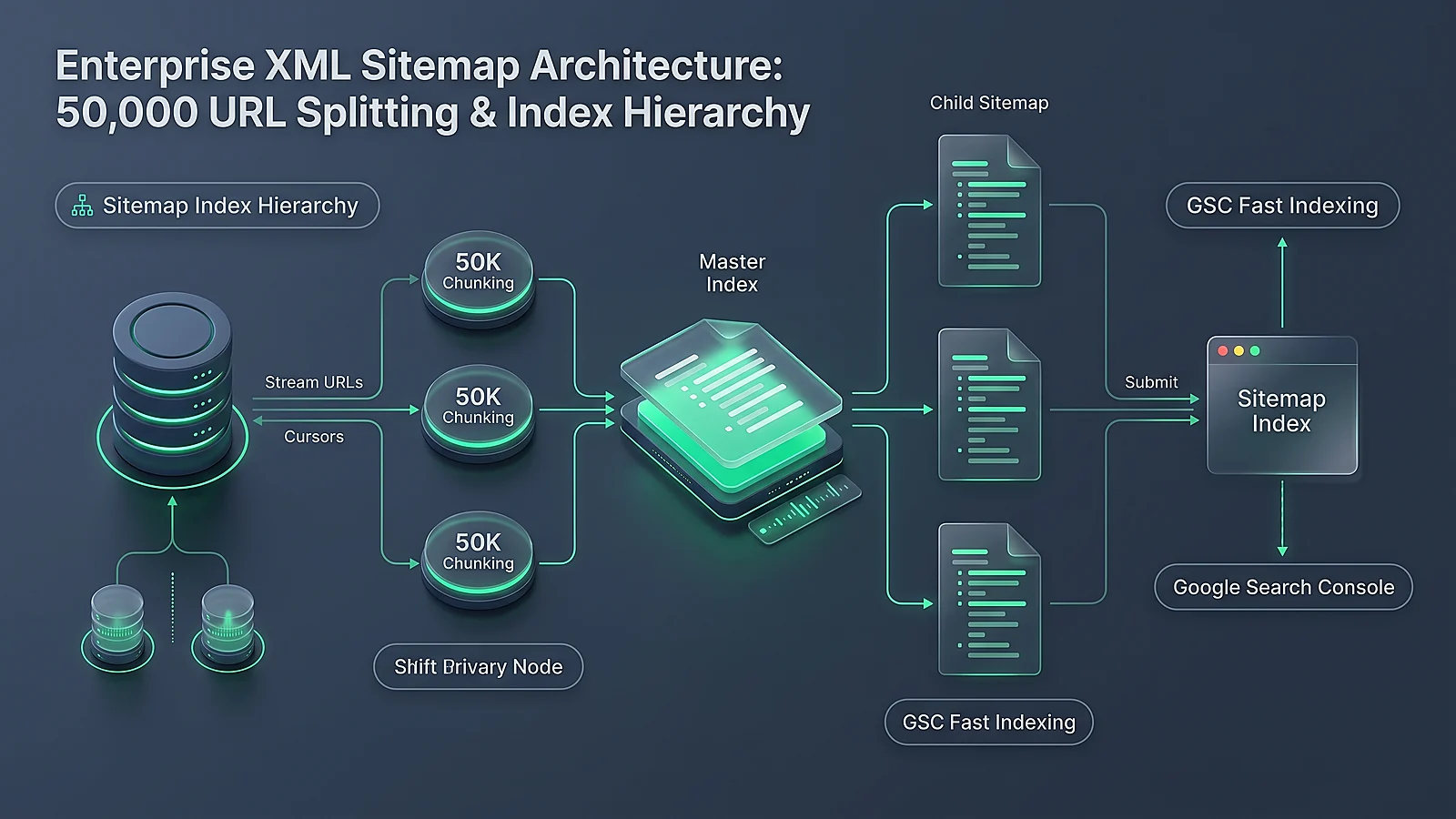
Google's sitemap specifications enforce strict limits: a single sitemap file may not contain more than 50,000 URLs or exceed 50MB uncompressed. Enterprise architectures must implement a Sitemap Index structure that references paginated child sitemaps.
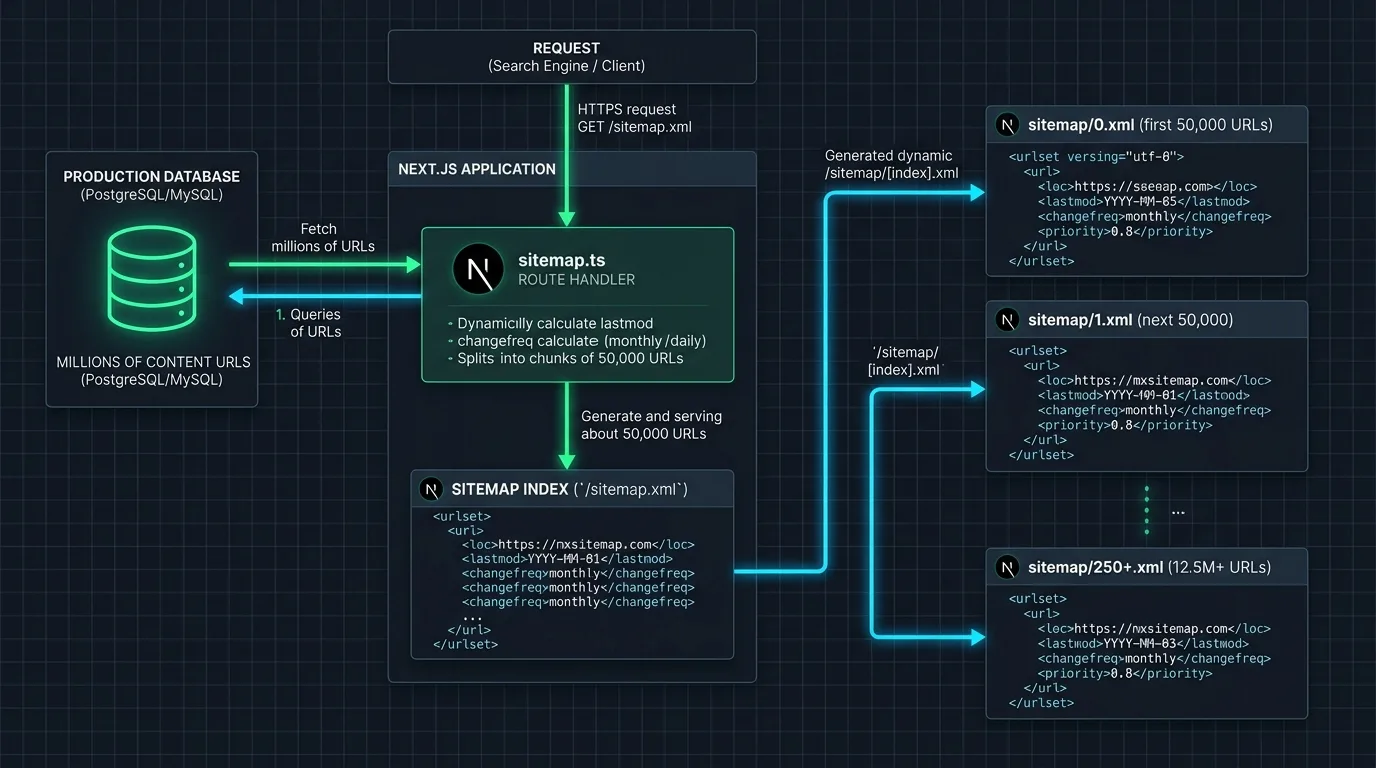
Figure 4: Automated Next.js sitemap route handler partitioning millions of database URLs into 50,000-entry sitemap index files.
In the App Router, generating a paginated sitemap is accomplished using the app/sitemap.ts file convention. The framework provides the generateSitemaps function to declare multiple sitemap segments automatically:
import type { MetadataRoute } from 'next';

const ITEMS_PER_SITEMAP = 25000;

export async function generateSitemaps() {
  const totalPosts = await fetchTotalPostCount();
  const totalSitemaps = Math.ceil(totalPosts / ITEMS_PER_SITEMAP);

  return Array.from({ length: totalSitemaps }, (_, id) => ({ id }));
}

export default async function sitemap({
  id,
}: {
  id: number;
}): Promise<MetadataRoute.Sitemap> {
  const start = id * ITEMS_PER_SITEMAP;
  const posts = await fetchPostsBatch(start, ITEMS_PER_SITEMAP);

  return posts.map((post) => ({
    url: `https://seobeen.com/blog/${post.slug}`,
    lastModified: new Date(post.updatedAt).toISOString(),
    changeFrequency: 'weekly',
    priority: 0.8,
  }));
}
This implementation automatically creates endpoints such as /sitemap/0.xml, /sitemap/1.xml, and a master /sitemap.xml index, ensuring your domain remains fully compliant with search engine crawl specifications regardless of catalog size.
6. Edge Rendering, Caching, and Incremental Static Regeneration (ISR)
Fast page speed and low server response latency (TTFB < 200ms) are direct ranking factors under Google's Core Web Vitals framework. Serving entirely dynamic server-rendered pages on every bot hit strains backend databases and increases latency during crawl surges.
Next.js App Router provides Incremental Static Regeneration (ISR), allowing you to cache server-rendered pages statically at the edge while revalidating them in the background based on time intervals or on-demand webhook triggers:
export const revalidate = 3600) rebuilds the static HTML page in the background once per hour when traffic arrives. On-demand revalidation (using revalidatePath('/blog/[slug]') or revalidateTag('posts')) purges edge cache instances instantly via CMS webhook triggers the exact second an article is edited.Deploying ISR alongside modern serverless CDN edge rules—as detailed in our Edge SEO and Cloudflare Workers blueprint—guarantees that search engine bots receive static-grade sub-20ms TTFB while your content remains continuously updated.

7. Canonical URLs, Robots.txt, and Multilingual Hreflang Configuration
Preventing duplicate content and managing crawl directives in Next.js requires adhering to strict configuration conventions:
- Convention-Based
robots.ts: Rather than serving a static text file, define your robots rules dynamically insideapp/robots.tsto automatically link your primary sitemap index and establish disallow parameters. - Enforcing Strict Canonical URLs: Always set
metadataBasein your rootapp/layout.tsx. This ensures that relative canonical paths resolve to absolute, standardized HTTPS URLs without accidental protocol or trailing slash discrepancies. - Multilingual Hreflang Alternates: When operating localized subdirectories (e.g.,
/en/,/de/,/es/), map language alternates directly inside thealternates.languagesobject of your metadata configuration.
These safeguards prevent crawl budget dilution and ensure search engines crawl only canonical, high-value pages as outlined in our crawl budget management guide.
8. Next.js App Router vs. Pages Router SEO Capabilities Matrix
The technical differences between the legacy Pages Router and the modern App Router are summarized in the comparative architecture matrix below:
| SEO Architecture Feature | Legacy Pages Router (pages/) |
Modern App Router (app/) |
|---|---|---|
| Default Component Execution | Client-side JavaScript with SSR wrapper | Server-side by default (React Server Components) |
| Client JS Bundle Size | Heavy; includes all page component code | Zero JS shipped for pure informational Server Components |
| Metadata Management | Manual next/head injection prone to hydration errors |
Native, type-safe generateMetadata lifecycle |
| Dynamic OpenGraph Images | External API routes or third-party image hosting | Native opengraph-image.tsx compiled at the edge via Satori |
| Sitemap Generation | Manual server-side script writing XML strings | Convention-based sitemap.ts with automatic paginated index splitting |
| Streaming SSR Support | Limited; requires buffering entire page before response | Native HTTP streaming via React Suspense boundaries |
| Googlebot First-Pass Indexing | May experience WRS render queue delays | Instantaneous first-pass indexing of raw HTML byte streams |
9. Enterprise Case Study: Migrating an E-Commerce Platform to Next.js App Router
To demonstrate the real-world organic impact of the App Router, consider the enterprise migration executed for NordicLiving, a Scandinavian home furnishings retailer with 35,000 product SKUs and 450,000 monthly organic visitors. NordicLiving had been operating on a legacy React SPA that suffered from severe hydration bottlenecks, poor Core Web Vitals, and an average Googlebot indexation latency of 18 days for new catalog items.
generateMetadata, and a paginated sitemap index was generated via sitemap.ts.Within 90 days of deploying the App Router architecture, NordicLiving observed transformative performance gains:
- Time to First Byte (TTFB) Reduced by 68%: Global average TTFB dropped from 620ms to 198ms via edge ISR caching.
- Core Web Vitals Pass Rate Surged to 94%: Largest Contentful Paint (LCP) improved from 3.8s to 1.6s, achieving a perfect "Good" rating in Google Search Console.
- Googlebot Crawl Latency Dropped by 85%: New product listing URLs were discovered and indexed within 24 to 48 hours of publication.
- Organic Search Revenue Increased by 42% YoY: First-page keyword rankings expanded across 1,800 competitive commercial search queries.
10. Frequently Asked Questions (FAQ)
Below are authoritative answers to the most common technical questions regarding Next.js App Router search engine optimization, rendering patterns, and metadata governance.


Ratings & reviews
No reviews yet. Be the first.