

In high-scale enterprise e-commerce platforms, product lifecycle churn is relentless. Thousands of SKUs sell out temporarily, seasonal lines expire, and older product models are permanently phased out every quarter. Mismanaging expired URLs creates catastrophic search engine failure modes: soft 404 inflation, crawl budget exhaustion, destroyed internal PageRank flow, and severe revenue loss when high-intent shoppers land on dead-end error pages. In 2026, handling out-of-stock and discontinued inventory is not an inventory management afterthought—it is a foundational technical SEO architecture.

1. The Four Inventory States: Classifying Stock Status in E-Commerce
Before applying technical redirection or HTTP headers, catalog engineers must classify inventory into one of four distinct operational states. Treating all unavailable items with the same blanket rule (such as indiscriminately deleting URLs or mass-redirecting to the home page) triggers severe algorithmic penalties.
- Temporary Out-of-Stock (Replenishment Expected < 30 Days): The product is currently unavailable, but purchase orders are active with suppliers. The SKU will return to inventory shortly.
- Extended Out-of-Stock (Lead Time > 60 Days): The SKU is backordered or seasonal. It will eventually return, but visitors cannot purchase it in the medium term.
- Permanently Discontinued with a Direct Successor: The product has reached end-of-life (EOL), but the manufacturer has launched an updated replacement (e.g., iPhone 15 replaced by iPhone 16).
- Permanently Discontinued with No Successor: The product is completely dead, discontinued across the industry, and has no direct alternative in your catalog.
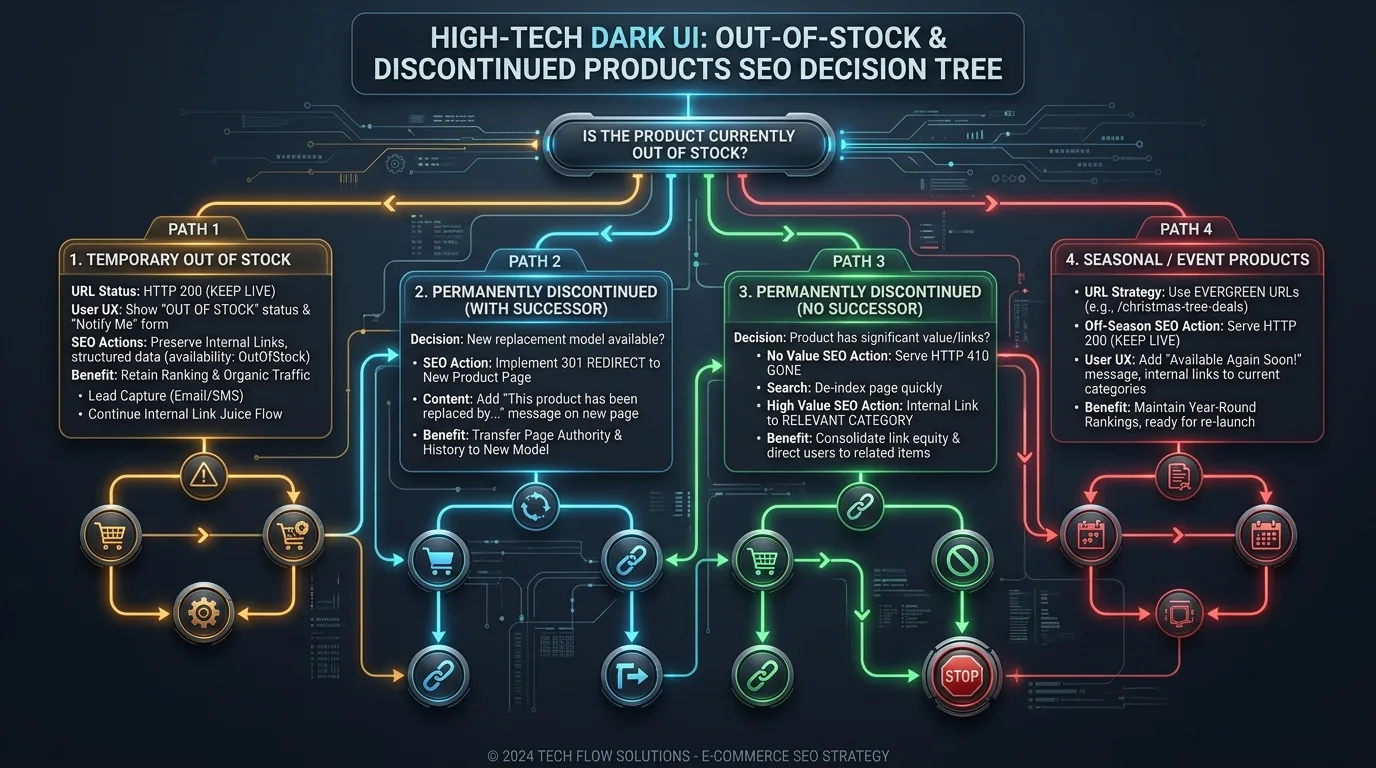
2. Temporary Out-of-Stock: Keeping the URL Live and Monetizing Demand
When an item is temporarily unavailable, never delete the URL, return a 404, or inject a 301 redirect. Doing so immediately causes Googlebot to de-index the page, wiping out accumulated historical rankings, customer reviews, and backlink authority that took years to cultivate.
UX and Conversion Tactics for Temporary Stockouts
Instead of turning shoppers away, transform the temporarily unavailable product detail page (PDP) into a lead generation and cross-selling hub:
- Back-in-Stock Notification Form: Replace the disabled "Add to Cart" button with an email/SMS waitlist form. Data reveals that back-in-stock alerts convert at over 22% when inventory returns.
- Curated Alternative Carousel: Display an automated recommendation widget featuring 3 to 4 closely related in-stock alternatives from the same category to capture immediate purchase intent.
- Transparent Restock Estimates: Provide an estimated replenishment date (e.g., "Restock expected October 12") to set realistic expectations and discourage shoppers from bouncing to competitors.
Schema Markup for Temporarily Unavailable Products
Update the Schema.org Product markup immediately. Keeping the availability set to InStock when the page shows out-of-stock will trigger Google Merchant Center suspensions and Schema quality penalties:
{
  "@context": "https://schema.org/",
  "@type": "Product",
  "name": "Enterprise Cloud Telemetry Router X9",
  "image": "https://example.com/images/router-x9.jpg",
  "offers": {
    "@type": "Offer",
    "priceCurrency": "USD",
    "price": "1499.00",
    "availability": "https://schema.org/OutOfStock",
    "itemCondition": "https://schema.org/NewCondition"
  }
}
3. Permanently Discontinued Products: 301 Redirect vs 410 Gone vs 404
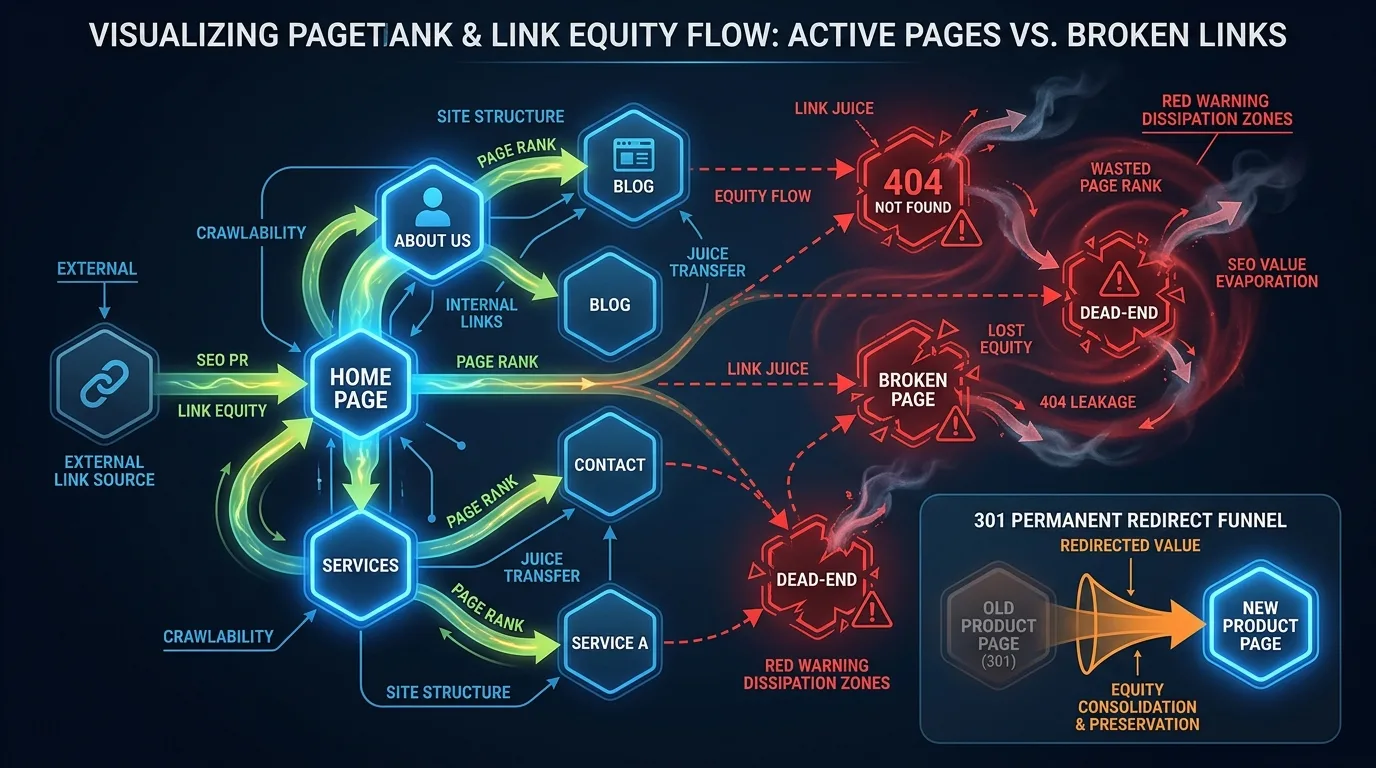
When an item is retired forever, catalog managers must execute an intentional retirement protocol to safeguard the domain's backlink equity and crawl budget. Review the technical mechanisms in our comprehensive reference on HTTP status codes and redirection best practices.
When to Deploy a 301 Permanent Redirect
Implement a server-side 301 Permanent Redirect if and only if there is a highly relevant replacement product. The replacement must satisfy the user's original commercial intent:
- Direct Successor SKU: Model X v1 redirects to Model X v2. Google transfers 100% of the original PageRank and keyword relevance to the new URL without triggering soft 404 penalties.
- Direct Parent Category (With Caution): If no direct replacement exists, redirecting to the hyper-specific sub-category (e.g., redirecting a specific running shoe to
/mens-trail-running-shoes) is acceptable ONLY if the category page immediately displays viable alternatives.
The Fatal Flaw of Mass Home Page Redirects (Soft 404 Penalties)
One of the most destructive legacy SEO mistakes is writing an automated wildcard script that 301-redirects all expired product URLs to the website homepage. Google's Gary Illyes and John Mueller have repeatedly confirmed that redirecting irrelevant expired pages to the homepage is algorithmically classified as a Soft 404. Googlebot drops the ranking signals, treats the redirect as invalid, and penalizes your site's crawl trust score.

4. When to Deploy HTTP 410 Gone vs HTTP 404 Not Found
If a product is permanently discontinued, possesses zero external backlinks, generates zero organic search impressions, and has no logical successor, the cleanest technical protocol is to return an explicit HTTP 410 Gone status code.
| Protocol Dimension | HTTP 404 Not Found | HTTP 410 Gone | 301 Permanent Redirect |
|---|---|---|---|
| Crawler Semantic Meaning | Resource missing, potentially temporary | Resource permanently purged, never returning | Resource permanently relocated to new URL |
| Googlebot De-indexing Speed | Slow (Googlebot revisits 2-4 times before purging) | Fast (Googlebot purges from index immediately) | Instant transfer of ranking signals to target URL |
| Link Equity Transfer | 0% (All accumulated PageRank is destroyed) | 0% (All accumulated PageRank is destroyed) | 95% – 100% passed to target successor page |
| Server Overhead | Standard 404 error page rendering | Ultra-low payload response header | Single HTTP 301 header with Location pointer |
| Recommended Use Case | Accidental typos or non-existent URLs | Discontinued SKUs with zero backlinks or successors | Discontinued SKUs with direct product upgrades |
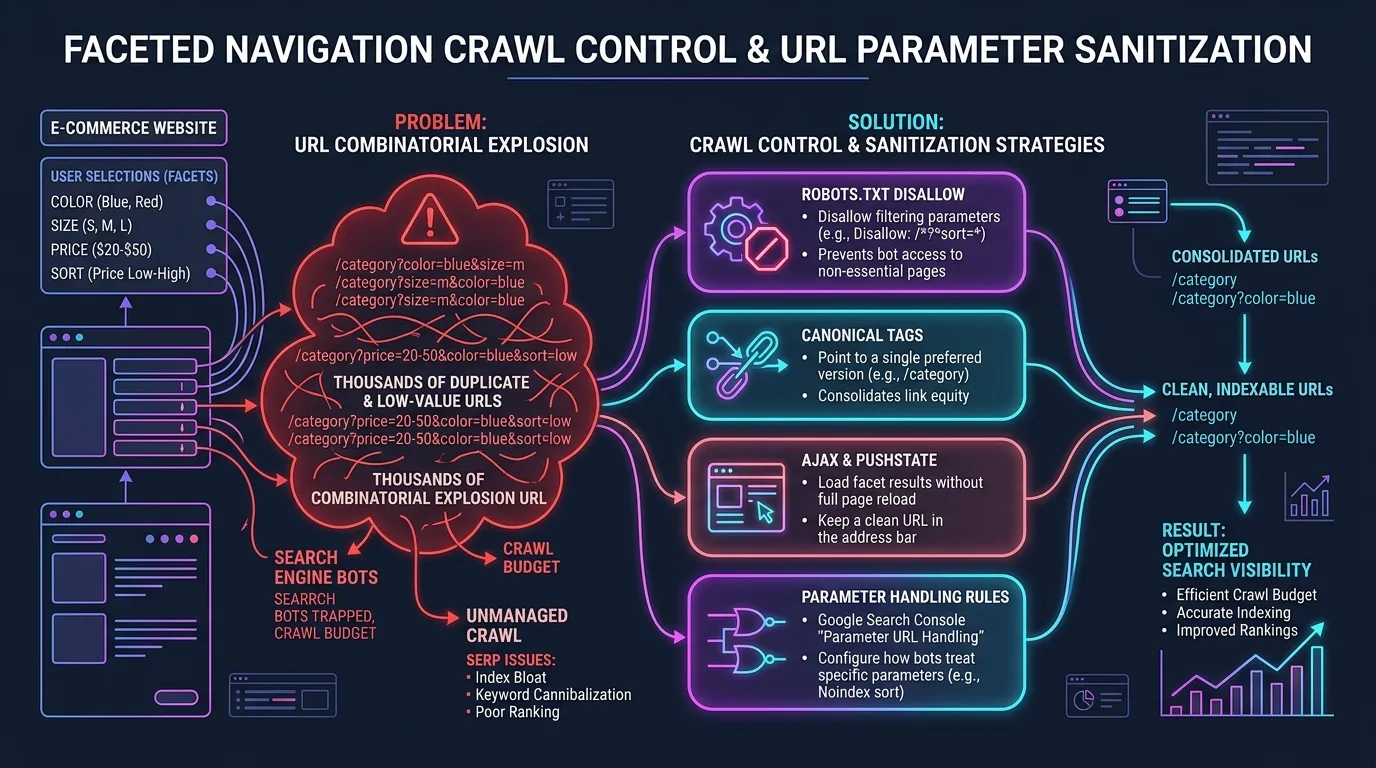
5. Managing Crawl Budget on High-Churn Faceted Catalogs
Large e-commerce catalogs featuring faceted filtering (color, size, brand, price) create exponential URL combinations. When thousands of products go out of stock, faceted navigation URLs can rapidly multiply into millions of low-quality orphan pages.
The Faceted Stockout Rule
Enforce the following technical safeguards across your faceted navigation engine:
- Auto-Disable Empty Facets: When an attribute filter combination yields zero in-stock products (e.g., "Red + Size XXL + Waterproof"), the navigation UI must either hide the checkbox or mark it non-clickable, preventing search engines from discovering an empty results page.
- Robots Meta Tag Dynamic Invalidation: If a user or bot accesses a faceted URL where all matching products are out of stock, automatically inject a
<meta name="robots" content="noindex, follow">header to prevent indexation while allowing PageRank to flow through internal links. - Canonical Tag Self-Referencing Rules: Ensure canonical tags never point from an in-stock variant to an out-of-stock variant, or vice versa.
- URL Parameter Normalization: Configure server-side URL rewriting to strip non-essential tracking parameters and order attributes deterministically (e.g., always
/shoes?color=black&size=10rather than varying parameter sequences), preventing duplicate crawl traps. - Pagination Cleanup for Depleted Categories: When product depopulation reduces total catalog items, dynamically adjust pagination limits and return an immediate 404 or redirect for legacy deep pagination URLs (e.g.,
?page=45when only 3 pages remain).
6. Edge Redirection at Scale with Cloudflare Workers
In enterprise architectures managing 500,000+ SKUs, routing expired product lookups through application servers (Node.js, PHP, Ruby) wastes precious server compute. Moving product status code evaluation to the Edge CDN ensures sub-10ms response times and zero server strain:
// Cloudflare Worker: Enterprise E-Commerce URL Lifecycle Router
addEventListener('fetch', event => {
  event.respondWith(handleRequest(event.request));
});

async function handleRequest(request) {
  const url = new URL(request.url);
  const path = url.pathname;

  // Check KV Store for retired SKU mapping
  const redirectTarget = await SKU_REDIRECTS.get(path);
  if (redirectTarget) {
    return Response.redirect(redirectTarget, 301);
  }

  const isPurged = await PURGED_SKUS.get(path);
  if (isPurged) {
    return new Response('410 Gone - This product has been permanently discontinued.', {
      status: 410,
      headers: { 'Content-Type': 'text/plain; charset=utf-8', 'Cache-Control': 'public, max-age=604800' }
    });
  }

  return fetch(request);
}
7. Server-Level Redirect Configurations: Nginx and Apache Directives
For platforms running dedicated web servers, implementing status codes at the reverse proxy layer prevents unnecessary database queries when search engines crawl retired catalog archives:
# Nginx Configuration: Handling Discontinued E-Commerce SKUs
# 1. Direct successor 301 redirection
location = /products/cloud-telemetry-router-v1 {
    return 301 /products/cloud-telemetry-router-v2;
}

# 2. Permanent 410 Gone for dead inventory with zero backlinks
location ~ ^/products/(legacy-adapter-2018|discontinued-sensor-x1) {
    return 410 "Product permanently removed.";
    add_header Cache-Control "public, max-age=2592000"; # Cache for 30 days
}
8. Auditing and Remedying Internal Broken Links to Expired SKUs
Implementing 301 redirects and 410 headers resolves crawler issues at the destination URL, but it leaves an expensive residual problem: internal link degradation. When your category pages, blog guides, and header menus continue linking to redirected or 410 URLs, Googlebot must waste crawl requests following redirect hops and internal PageRank is progressively dissipated.
Enforce an automated catalog crawler that flags any active internal anchor pointing to an out-of-stock or discontinued SKU. Update CMS templates to remove dead links or redirect them directly to the modern successor URL at the template render layer, ensuring a 100% clean internal link topology.
9. Automated XML Sitemap Hygiene for Expired Inventory
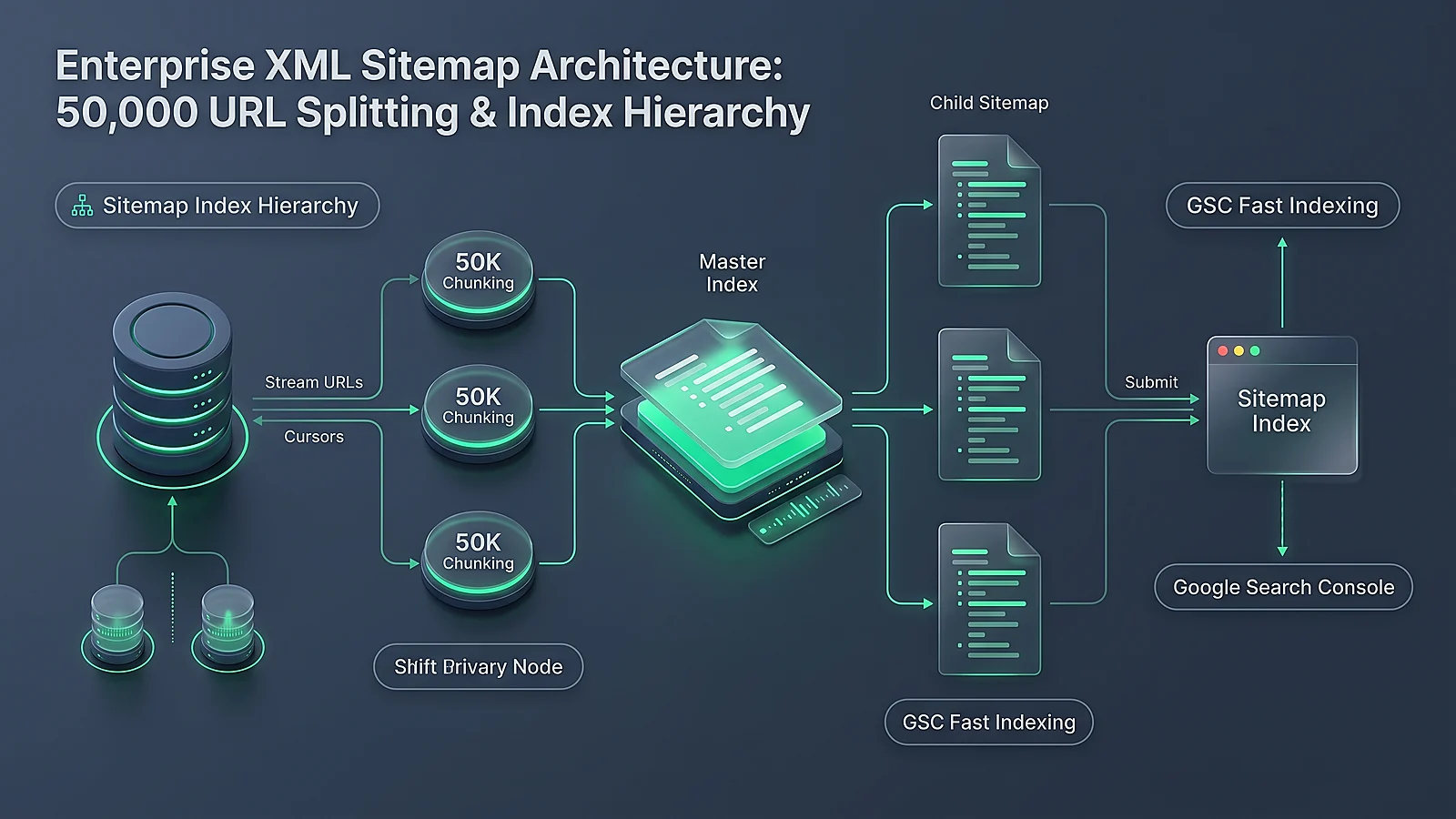
Your XML sitemaps serve as Googlebot's direct discovery roadmap. Including out-of-stock and discontinued URLs in sitemaps wastes crawl budget and generates crawling errors in Search Console. Table 2 summarizes the required sitemap automation policies:
| Product Inventory State | Sitemap Inclusion Policy | Priority / Changefreq | Automated Purge SLA |
|---|---|---|---|
| Active In-Stock | Included in primary category sitemap | Priority: 0.8, Daily | N/A |
| Temporary Out-of-Stock (< 30d) | Retained in sitemap | Priority: 0.5, Weekly | Retain until restocked |
| Extended Out-of-Stock (> 60d) | Removed from main sitemap; placed in backorder queue | Priority: 0.3, Monthly | Purge within 24 hours of 60-day threshold |
| Discontinued (301 Redirected) | Immediately removed from sitemap | Excluded | Purge within 1 hour of redirect activation |
| Discontinued (410 Gone) | Moved to temporary "purged-urls.xml" sitemap for 30 days to accelerate de-indexing | Priority: 0.1, Never | Delete temporary sitemap after 30 days |
10. The Enterprise Inventory SEO Governance Checklist
Implement this continuous audit checklist across your e-commerce merchandising and engineering teams:
- Audit High-Backlink Expired URLs: Export your top 1,000 linked pages from Google Search Console and Ahrefs quarterly. Verify that no high-equity URL is returning a 404 or soft 404.
- Sync Schema Availability in Real-Time: Connect your ERP/WMS inventory database to your CMS page cache so Schema.org
OutOfStockflags update within 5 minutes of warehouse exhaustion. - Validate Replacement Relevance: Enforce an editorial rule that 301 redirects must point to identical category successors; forbid wildcard redirects to the homepage.
- Implement Edge Header Caching: Cache 410 and 301 headers at the CDN edge for at least 7 days to eliminate server load during heavy bot crawl bursts.
- Monitor Merchant Center Feed Errors: Conduct daily inspections of Google Merchant Center diagnostics to address price and availability mismatches before product feeds are throttled.
11. Frequently Asked Questions (FAQ)
Should I 301 redirect an out-of-stock product to the home page?
No, absolutely not. Google classifies redirects from specific product pages to the home page as Soft 404 errors. This invalidates the redirect, discards accumulated link equity, and can damage your site's overall crawl quality score. Always redirect to a direct product replacement or relevant subcategory.
How should I handle products that are out of stock for only 2 to 3 weeks?
Keep the URL live with a 200 OK status code. Update the Schema.org availability to OutOfStock, replace the add-to-cart button with an email back-in-stock notification form, and present related in-stock alternatives. Do not delete or redirect the URL.
What is the technical difference between HTTP 404 and HTTP 410 for SEO?
HTTP 404 indicates that the resource is not currently found, prompting Googlebot to recrawl the URL several times before de-indexing. HTTP 410 explicitly signals that the resource has been permanently removed, causing search engines to de-index the page significantly faster.
When is it appropriate to use a 301 redirect for a discontinued product?
A 301 redirect should be used when you have a direct successor product (e.g., an updated model) or a highly relevant alternative within the exact same category. This preserves user intent and transfers accumulated backlink equity.
How does keeping discontinued products live hurt website SEO?
Leaving thousands of permanently dead products live without conversion options creates thin content, increases site-wide bounce rates, dilutes internal linking authority, and exhausts Googlebot crawl budget on pages that generate zero business value.
Should out-of-stock products remain in the XML sitemap?
Temporarily out-of-stock items can remain in the sitemap. However, permanently discontinued products, 301-redirected URLs, and 410 pages should be purged from standard sitemaps to prevent wasting search engine crawl resources.
Can I use rel="canonical" pointing to a category page instead of a 301 redirect?
No. Canonical tags should only be used between pages that share substantially identical content. Using a canonical tag from an out-of-stock product page to a category page will be ignored by Google as an invalid canonicalization.
How do seasonal products (e.g., holiday gifts) differ in SEO management?
Seasonal product pages should retain their URL structure year-round. During the off-season, keep the page live with an off-season message and waitlist capture form rather than deleting the page, preserving historical ranking signals for the next seasonal spike.
What happens if my structured data says InStock but the page says Out of Stock?
This discrepancy triggers a structured data mismatch penalty and can lead to immediate disapproval in Google Merchant Center and Google Shopping. Your page metadata and visible frontend state must always remain synchronized.
How can I preserve internal PageRank when hundreds of items sell out?
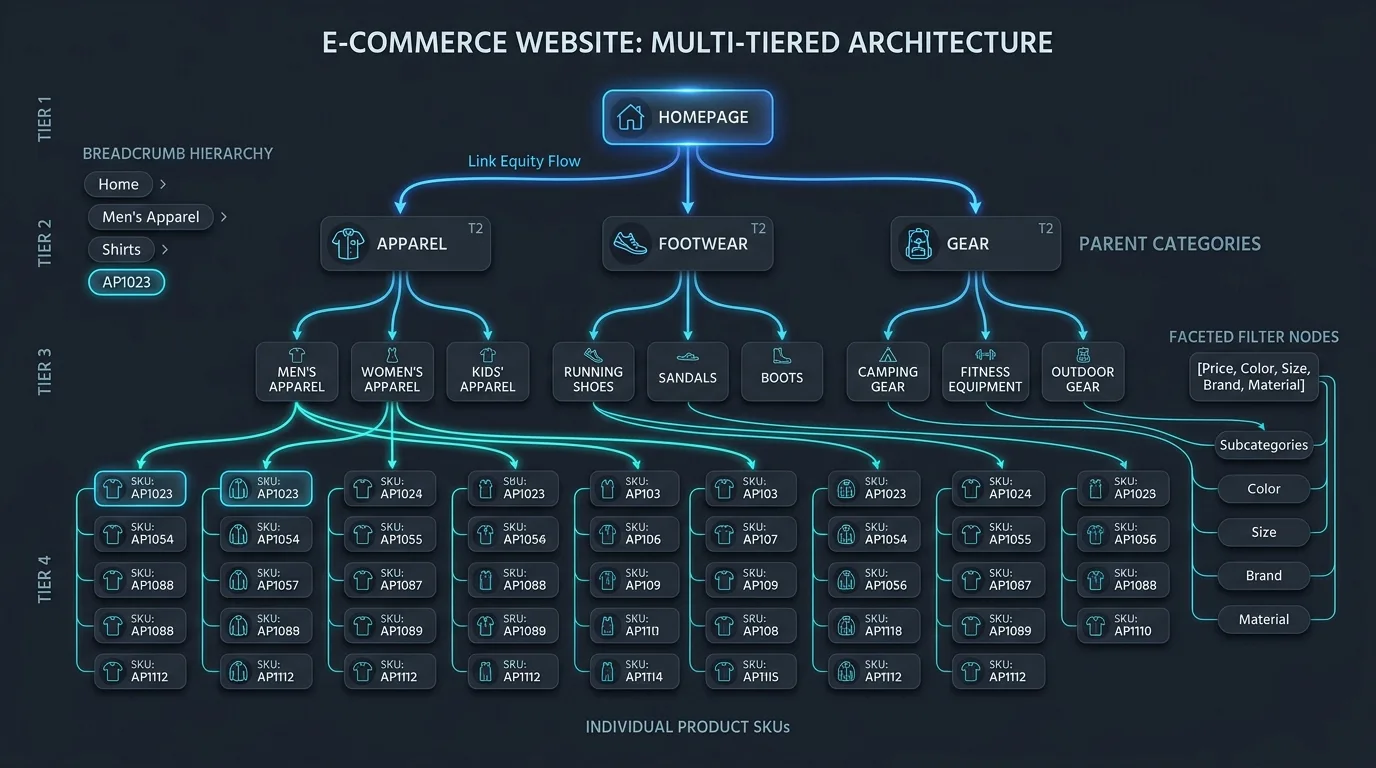
Ensure that category pages automatically push out-of-stock products to the bottom of product grids, and update internal links to direct user and bot traffic toward high-converting in-stock inventory while maintaining breadcrumb hierarchy.


Ratings & reviews
No reviews yet. Be the first.