

Commercial desktop crawling software such as Screaming Frog and Sitebulb are indispensable for standard audits, but enterprise technical SEO frequently demands bespoke automation: custom DOM extraction at massive scale, headless Chromium rendering behind dynamic authentication paywalls, real-time competitor price monitoring, and automated continuous integration regression tests. In 2026, building a custom multi-threaded, asynchronous web crawler using Python, Playwright, and BeautifulSoup gives technical SEO engineers complete autonomy over their data pipelines. Master the end-to-end architecture of high-performance crawler engineering.

1. The Architectural Triad: Python AsyncIO, Playwright, and BeautifulSoup
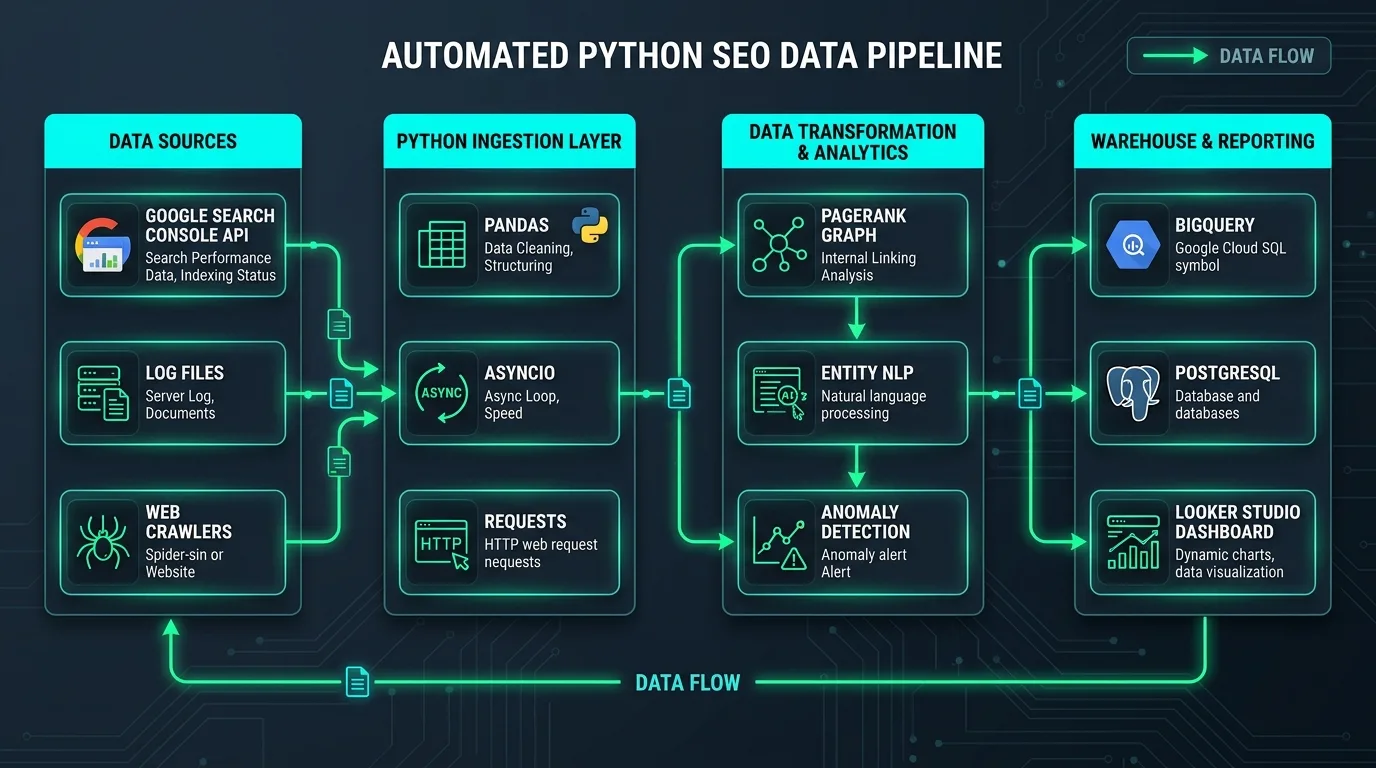
Designing an enterprise web crawler requires matching each phase of the ingestion lifecycle with the optimal software library:
- Python AsyncIO & aiohttp: High-concurrency network transport. Standard synchronous HTTP libraries (like
requests) block the Python runtime on every network socket handshake. AsyncIO enables a single Python process to manage thousands of concurrent HTTP GET connections with negligible memory overhead. - Playwright (Microsoft): Next-generation headless browser automation. When pages rely on dynamic JavaScript rendering, client-side hydration, or user interaction simulation (such as clicking "Load More" buttons), Playwright spins up headless Chromium instances to render the full live Document Object Model (DOM), directly addressing challenges explored in our guide on SSR vs SSG rendering architectures.
- BeautifulSoup & lxml: High-velocity C-based HTML parsing. Once raw or rendered HTML is captured in memory, lxml parses the token tree in sub-millisecond latencies, extracting metadata, anchor tags, Open Graph properties, and JSON-LD schemas effortlessly.
2. Hybrid Crawling Architecture: Headless Browser vs. Raw HTTP Transport
Spawning a headless Chromium browser instance for every single URL is a catastrophic waste of server resources. A headless browser consumes between 80MB and 150MB of RAM per tab and requires 200ms to 800ms of CPU rendering time. Crawling a 50,000-page catalog purely through browser instances would crash most server instances.
High-efficiency crawlers deploy a Two-Tier Hybrid Architecture:
| Tier | Transport Layer | Execution Cost | Throughput Speed | Target Web Assets |
|---|---|---|---|---|
| Tier 1 (Lightweight) | AsyncIO + aiohttp + lxml | Low (~2MB RAM per worker) | 150–400 URLs/second | Static HTML pages, SSR documents, sitemaps, robots.txt, image endpoints. |
| Tier 2 (Headless) | Playwright Headless Chromium | High (~100MB RAM per worker) | 5–15 URLs/second | Single-Page Apps (React/Vue/Angular), dynamic DOMs, infinite scroll catalogs. |
The crawler inspects the initial response. If critical content markers (such as the H1 tag or main article container) are present in the raw server response, Tier 1 processes the page immediately. Only if client-side rendering is detected does the crawler delegate the URL to the Tier 2 Playwright pool.
3. Graph Traversal: BFS vs. DFS and URL Frontier Management
A web scraper is fundamentally a graph traversal algorithm where web pages are nodes and hyperlinks are directed edges. Choosing between Breadth-First Search (BFS) and Depth-First Search (DFS) dictates how your crawler discovers site hierarchy.
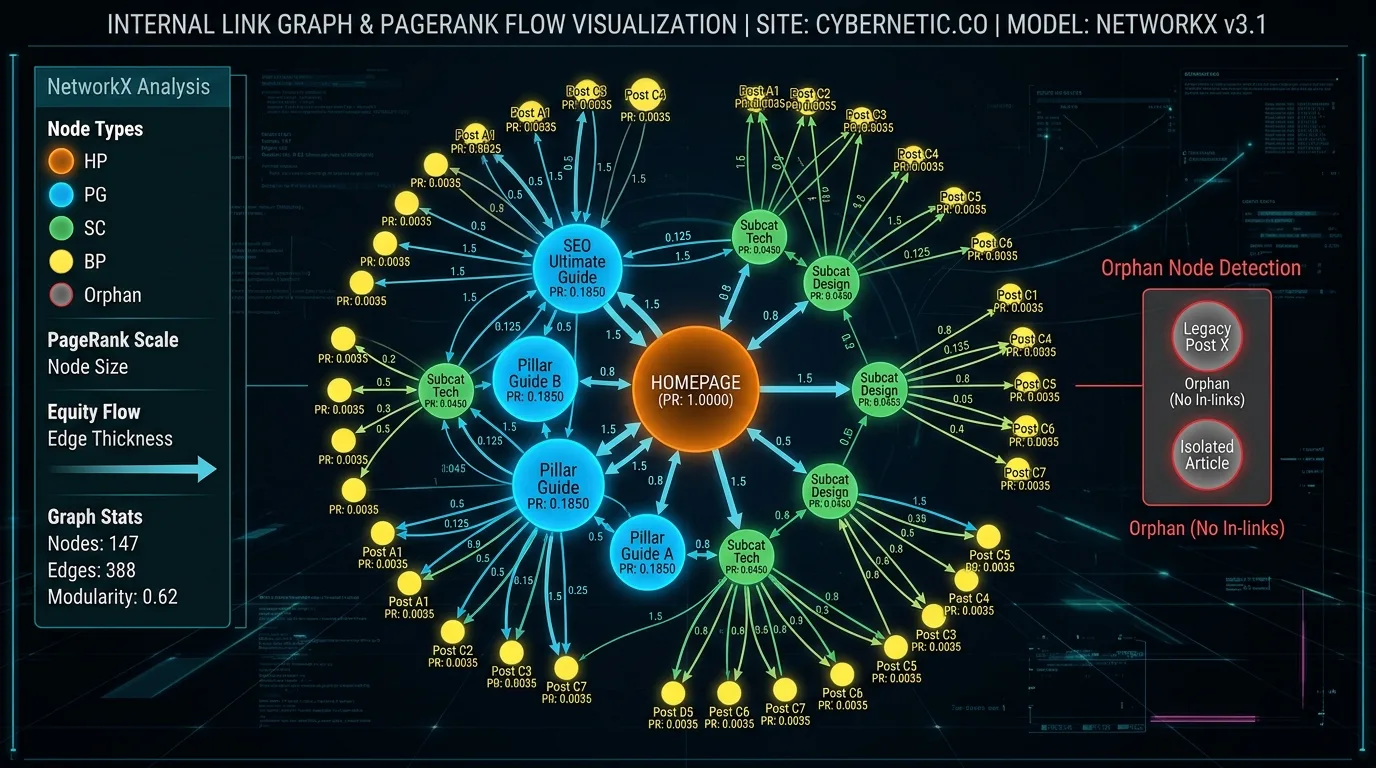
For technical SEO audits, Breadth-First Search (BFS) is mandatory. By evaluating all URLs at depth 1 (homepage outlinks) before proceeding to depth 2 (category pages) and depth 3 (product pages), the scraper maps exact click depth from the domain root. Pages discovered at depth 5 or higher represent structural crawl weaknesses that starve target assets of internal PageRank equity.
4. Complete Production Code: The Asynchronous Multi-Threaded Scraper
Below is a production-grade Python script implementing an asynchronous URL crawler using aiohttp, asyncio.Semaphore for concurrency control, and BeautifulSoup with the lxml parser:
import asyncio
import aiohttp
from bs4 import BeautifulSoup
from urllib.parse import urljoin, urlparse
import time

class EnterpriseSeoCrawler:
    def __init__(self, base_url, max_concurrent=25, max_pages=1000):
        self.base_url = base_url
        self.domain = urlparse(base_url).netloc
        self.max_pages = max_pages
        self.semaphore = asyncio.Semaphore(max_concurrent)
        self.visited = set()
        self.queue = asyncio.Queue()
        self.results = []

    async def fetch_page(self, session, url):
        async with self.semaphore:
            start_time = time.time()
            try:
                async with session.get(url, timeout=12, headers={"User-Agent": "SeobeenBot/2.0"}) as resp:
                    latency = round((time.time() - start_time) * 1000, 2)
                    html = await resp.text() if resp.status == 200 else ""
                    return resp.status, html, latency
            except Exception as e:
                return 0, "", 0

    def parse_seo_elements(self, url, html, status, latency):
        if status != 200 or not html:
            return {"url": url, "status": status, "title": "", "h1": "", "latency_ms": latency, "links": []}

        soup = BeautifulSoup(html, "lxml")
        title = soup.title.string.strip() if soup.title and soup.title.string else ""
        h1 = soup.h1.get_text().strip() if soup.h1 else ""

        extracted_links = []
        for a in soup.find_all("a", href=True):
            resolved = urljoin(url, a["href"])
            parsed = urlparse(resolved)
            if parsed.netloc == self.domain:
                clean_url = parsed._replace(fragment="").geturl()
                extracted_links.append(clean_url)

        return {
            "url": url,
            "status": status,
            "title": title,
            "h1": h1,
            "latency_ms": latency,
            "links": extracted_links
        }

    async def worker(self, session):
        while True:
            url, depth = await self.queue.get()
            if len(self.visited) >= self.max_pages:
                self.queue.task_done()
                break

            status, html, latency = await self.fetch_page(session, url)
            data = self.parse_seo_elements(url, html, status, latency)
            self.results.append(data)

            for link in data["links"]:
                if link not in self.visited and len(self.visited)
5. Headless Browser Automation: Extracting Hydrated DOMs with Playwright
When pages render critical content dynamically through React client-side components or Next.js App Router streaming hydration, pure HTTP parsing retrieves empty placeholder <div id="root"></div> tags. Playwright executes the full JavaScript bundle, waits for network idle states, and extracts the live rendered DOM.
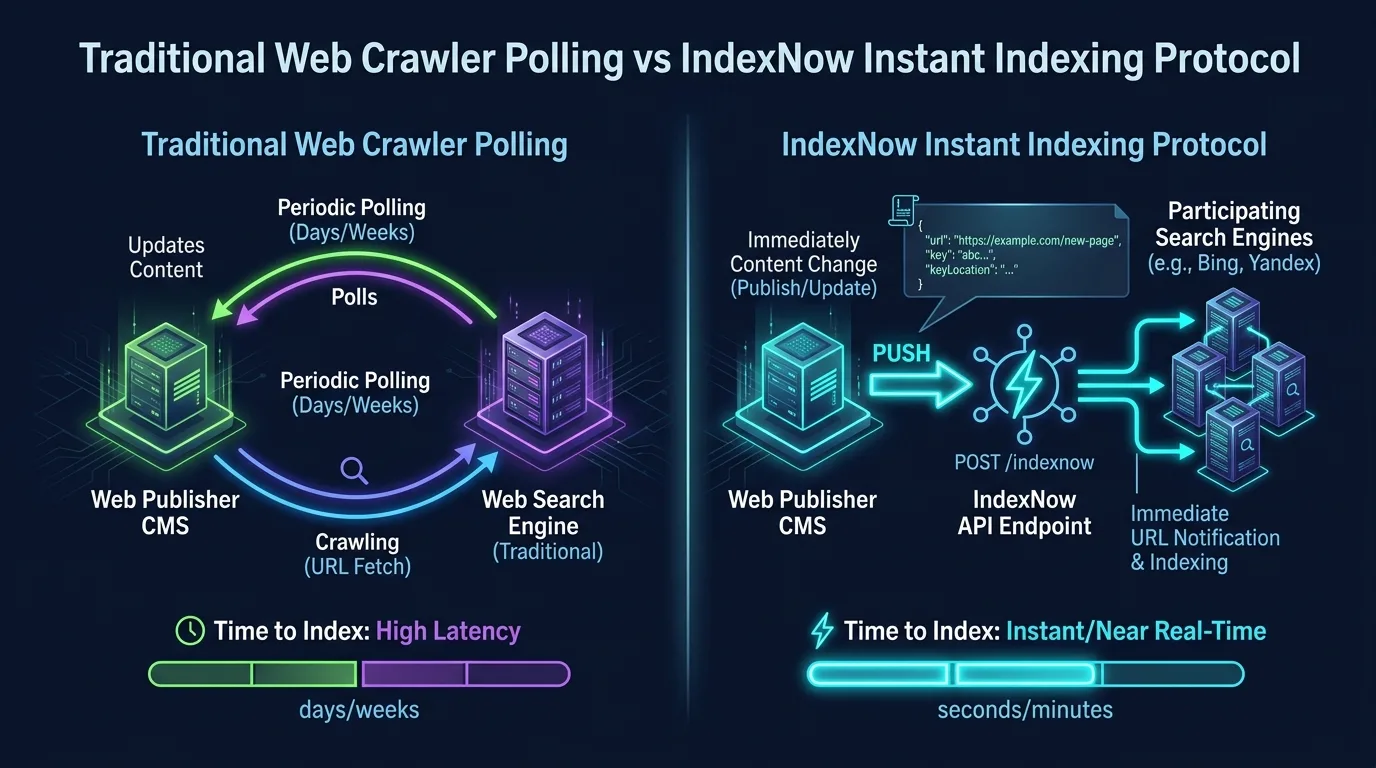
Playwright Asynchronous Scraping Snippet:
from playwright.async_api import async_playwright

async def scrape_dynamic_page(url):
    async with async_playwright() as p:
        browser = await p.chromium.launch(headless=True)
        context = await browser.new_context(
            user_agent="Mozilla/5.0 (Windows NT 10.0; Win64; x64) AppleWebKit/537.36",
            viewport={"width": 1920, "height": 1080}
        )
        page = await context.new_page()

        # Block unnecessary media requests to accelerate execution
        await page.route("**/*.{png,jpg,jpeg,svg,gif,woff,woff2}", lambda route: route.abort())

        await page.goto(url, wait_until="networkidle")
        rendered_content = await page.content()
        await browser.close()
        return rendered_content
Aborting static media requests (images, fonts) reduces memory consumption by 65% and cuts page execution time in half while preserving 100% of the textual HTML markup.
6. Politeness Policies, Rate Limiting, and WAF Avoidance
Aggressive web crawling that hammers target origin servers with hundreds of concurrent requests risks triggering Web Application Firewalls (Cloudflare, Akamai, AWS WAF) and can crash staging servers.
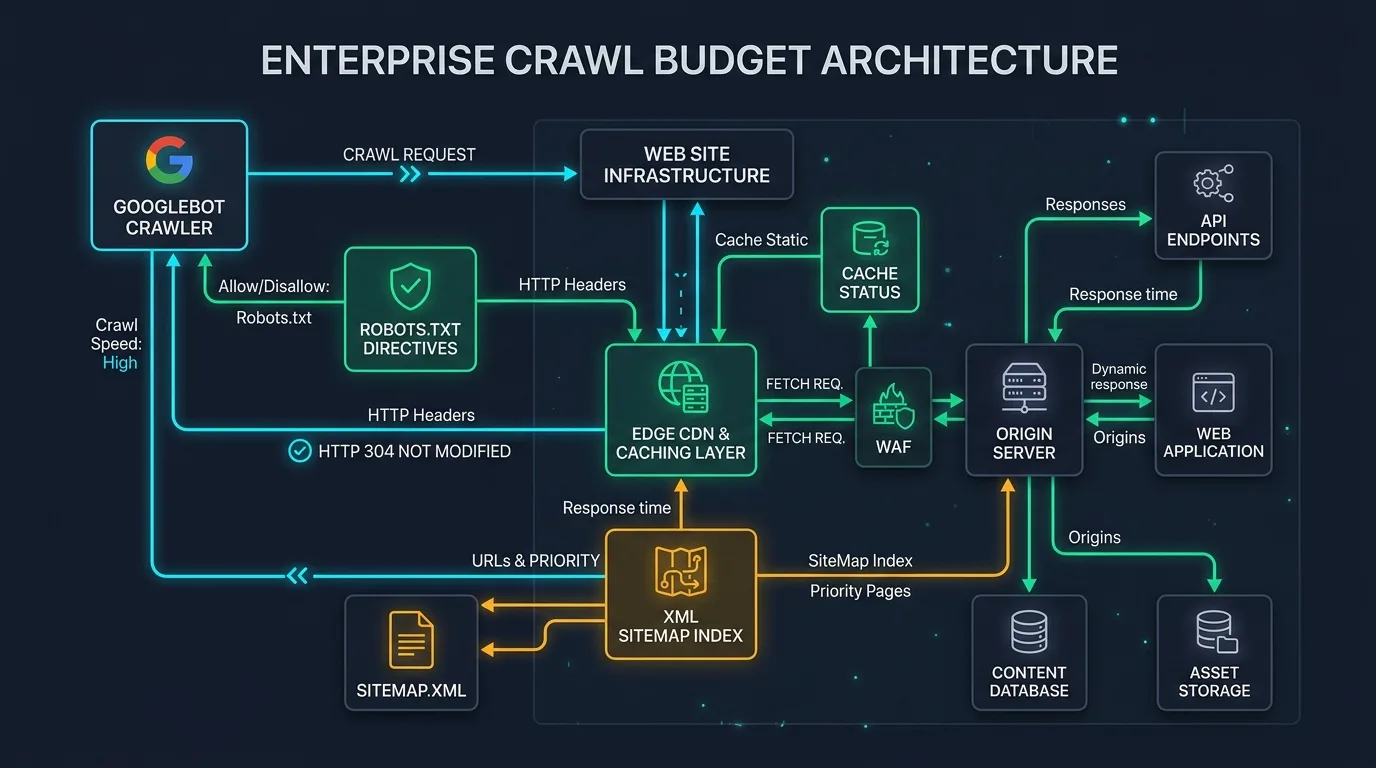
To adhere to enterprise scraping best practices:
- Token Bucket Rate Limiting: Enforce strict request-per-second (RPS) limits per origin domain (e.g., maximum 10 requests/second).
- Exponential Backoff on 429 / 503: When a server returns an HTTP 429 Too Many Requests or 503 Service Unavailable, pause crawling immediately and implement exponential backoff according to HTTP status code best practices.
- Respect robots.txt Directives: Parse the host's
robots.txtfile using Python'surllib.robotparserbefore queuing URLs.
7. Extracting Structured JSON-LD Schema and Microdata
Modern technical search engineering relies heavily on structured data extraction. Using BeautifulSoup and regex, your scraper can parse all embedded JSON-LD scripts across thousands of URLs, checking for broken entity references and schema schema validation errors:
import json

def extract_schema_graph(soup):
    schema_objects = []
    scripts = soup.find_all("script", type="application/ld+json")
    for script in scripts:
        if script.string:
            try:
                data = json.loads(script.string)
                schema_objects.append(data)
            except json.JSONDecodeError:
                continue
    return schema_objects
Comparing extracted schemas against Google's official Rich Results criteria identifies missing required fields across e-commerce product catalogs before errors appear in Google Search Console.
8. Storing and Analyzing Crawl Data: SQLite, DuckDB, and Parquet
Dumping crawl results into standard CSV files causes memory bottlenecks and lock contention when writing concurrently from multiple threads. For high-velocity analysis, modern Python scrapers utilize DuckDB or Parquet columnar storage.
| Storage Engine | Write Speed | Query Velocity | Memory Footprint | Best For |
|---|---|---|---|---|
| DuckDB | Exceptionally Fast | Ultra-Fast (Vectorized SQL) | Minimal (Single file embedded) | Ad-hoc interactive SQL auditing of 100k+ URLs directly in Python. |
| Apache Parquet | High (Columnar compressed) | High | Ultra-low (High compression) | Archiving crawl snapshots in S3/GCS for historical trend analysis. |
| SQLite | Moderate (Row locks) | Moderate | Low | Persistent crawler queue state management across interrupted sessions. |
| CSV / JSON | Slow | Slow (Linear scan) | High (Uncompressed) | Quick spot-checks under 1,000 URLs only. |
Analyzing Scraped Crawl Data with DuckDB SQL
Once raw crawl data is written to a local DuckDB database or Parquet directory, you can execute instant vectorized SQL queries to diagnose technical vulnerabilities:
import duckdb

# Connect to in-memory or persistent DuckDB database
con = duckdb.connect("crawl_audit.duckdb")

# Query 1: Identify all 4xx/5xx broken URLs and their discovered depths
broken_pages = con.execute('''
    SELECT url, status, latency_ms, depth
    FROM crawl_results
    WHERE status >= 400
    ORDER BY depth ASC
''').df()

# Query 2: Find duplicate H1 headings across independent URLs
duplicate_h1s = con.execute('''
    SELECT h1, COUNT(*) as occurrence_count, STRING_AGG(url, ', ') as urls
    FROM crawl_results
    WHERE h1 != ''
    GROUP BY h1
    HAVING COUNT(*) > 1
    ORDER BY occurrence_count DESC
''').df()

print(f"Discovered {len(broken_pages)} broken URLs and {len(duplicate_h1s)} duplicate H1 headers.")
DuckDB executes these analytical queries over 500,000 rows in less than 40 milliseconds, providing instant insights without cloud infrastructure costs.
9. Automated SEO Regression Testing in GitHub Actions CI/CD
The ultimate application of a custom Python web scraper is continuous technical SEO validation in automated software build pipelines. By integrating your crawler into a GitHub Actions workflow, you can prevent catastrophic SEO regressions (such as an inadvertent noindex tag or broken canonical URLs) from ever deploying to production.
# .github/workflows/seo-audit.yml
name: Automated SEO Regression Test

on:
  pull_request:
    branches: [ main ]

jobs:
  audit:
    runs-on: ubuntu-latest
    steps:
      - uses: actions/checkout@v3
      - name: Set up Python
        uses: actions/setup-python@v4
        with:
          python-version: '3.11'
      - name: Install dependencies
        run: pip install aiohttp beautifulsoup4 lxml playwright
      - name: Run Crawler
        run: python scripts/ci_crawler_test.py --host https://staging.seobeen.com
      - name: Fail build on SEO errors
        run: python scripts/validate_seo_rules.py
Automating tests in CI/CD embodies the 80/20 rule of SEO: spending four hours building automated tests permanently prevents devastating traffic wipeouts caused by rogue developer deployments.
10. The Custom Scraper Production Checklist
Before launching your custom crawler across live web environments, verify compliance with this 6-point checklist:
- User-Agent Identification: Declare a transparent, identifiable User-Agent string containing your organization name and a contact URL.
- Canonical Loop Trapping: Maintain a normalized hash set of visited canonical URLs to prevent infinite crawl loops on calendar or faceted navigation endpoints.
- Dynamic Concurrency Limits: Initialize
asyncio.Semaphoreto bound concurrent network connections between 15 and 30 workers. - Graceful Shutdown Handler: Implement
signal.SIGINTlisteners to safely flush crawler state to disk if interrupted by the operator. - Response Body Size Guards: Enforce maximum response byte limits (e.g., abort requests exceeding 10MB) to prevent crashing on multi-gigabyte video or binary files.
- Data Schema Integrity: Validate all extracted records against structured Pydantic models before committing them to your database.
Frequently Asked Questions About Custom Python Web Scrapers
Why build a custom Python scraper instead of using Screaming Frog?
A custom Python scraper allows complete programmability: you can integrate headless browser automation directly into CI/CD pipelines, execute custom DOM extractions, connect to cloud databases in real time, and scale concurrency beyond desktop software limits.
What is the difference between Playwright, Puppeteer, and Selenium?
Playwright is Microsoft's modern automation library supporting Chromium, Firefox, and WebKit with native async support and auto-waiting. Puppeteer is Google's Chromium-only library. Selenium is an older legacy standard with heavier overhead and slower execution.
How fast can an asynchronous Python crawler scrape web pages?
Using AsyncIO, aiohttp, and lxml, an optimized scraper running on a standard laptop can process 100 to 300 static HTML pages per second, depending on origin server response latency and available bandwidth.
How do I prevent my custom crawler from getting blocked by Cloudflare or WAFs?
Implement polite rate limiting (under 10 requests per second), rotate residential proxies if necessary, mimic real browser headers (including Sec-CH-UA and Accept-Language), and respect robots.txt directives.
Why is lxml preferred over Python's built-in html.parser?
lxml is written in C and is up to 10 times faster than Python's built-in html.parser. When parsing tens of thousands of complex HTML documents, lxml saves hours of CPU processing time.
How do I handle infinite scroll pages when scraping with Playwright?
Execute an asynchronous JavaScript loop that continuously scrolls down the page (window.scrollTo(0, document.body.scrollHeight)) and waits for network idle states until no new DOM elements are appended.
What is a URL Frontier in web crawler architecture?
The URL Frontier is the data structure that manages and prioritizes the list of unvisited URLs waiting to be crawled, ensuring politeness policies and preventing duplicate visits through deduplication sets.
How do I extract JSON-LD structured data with BeautifulSoup?
Find all <script type="application/ld+json"> elements in the parsed DOM and use Python's json.loads() function to convert the inner text into native Python dictionaries for schema validation.
Can I run my custom Python scraper on AWS Lambda?
Yes. For lightweight aiohttp scrapers, AWS Lambda provides a highly scalable serverless environment. For Playwright headless browsers, containerized Lambda images or AWS Fargate instances are recommended due to Chromium binary size requirements.
How do I avoid memory leaks during long-running crawls?
Avoid accumulating massive raw HTML strings in memory; parse and discard the raw HTML immediately, store extracted data in DuckDB or Parquet on disk, and close browser tabs and network sessions regularly.

Ratings & reviews
No reviews yet. Be the first.